You have already checked Google Scholar. You have already checked ResearchGate and found “Request full-text.” You still can’t unlock the IEEE paper. The methods below start with the simplest and most reliable ways to find free IEEE papers, then move into more advanced techniques like DOI searching, filetype operators, and repository targeting.
How did I test these IEEE download methods?
To evaluate the effectiveness of these workflows, I have tested these methods on 40+ IEEE papers across various engineering and technology fields.
- A free, legal version of the full text was successfully located in approximately 65–75% of cases.
- The highest success rates were achieved when using DOI-first searching combined with repository discovery tools.
- For the remaining papers, direct author requests via academic networks served as the most reliable fallback.
Conclusion: While not every paper is available for free, this protocol consistently surfaces the “Version of Record” or an accepted manuscript for the majority of IEEE publications.
1. How to Find IEEE Papers for Free Using Google (Filetype PDF Method)
Most people search the title. Pros search the server footprint.
Use these search strings (copy/paste)
A. Exact title + PDF
allintitle:"PAPER TITLE" filetype:pdf"PAPER TITLE" filetype:pdf
B. Target academic domains
"PAPER TITLE" site:.edu filetype:pdf"PAPER TITLE" site:.ac.uk filetype:pdf"PAPER TITLE" site:.edu "repository" filetype:pdf
C. Force “author version” language
"PAPER TITLE" ("accepted manuscript" OR "author manuscript" OR postprint OR preprint) filetype:pdfDOI ("accepted manuscript" OR repository)
Why this works: It skips publisher landing pages and hunts for hosted PDFs in repositories, labs, faculty pages, or departmental publication lists—one of the fastest ways to download IEEE papers for free in PDF format when an accessible copy exists.
2. How to Download IEEE Papers Using DOI (Fastest Method)
If you do one thing differently, do this: copy the DOI from IEEE Xplore and use it as your universal key. DOIs are far more precise than titles (which vary across versions and citations).
DOI workflow (90 seconds)
- Open the IEEE Xplore record (even if paywalled).
- Copy the DOI (e.g.,
10.xxxx/xxxxx). - Run:
DOI filetype:pdfDOI repositoryDOI "accepted manuscript"
If a free PDF version of the IEEE paper exists online without a subscription, DOI-first searching is usually the quickest way to surface it.
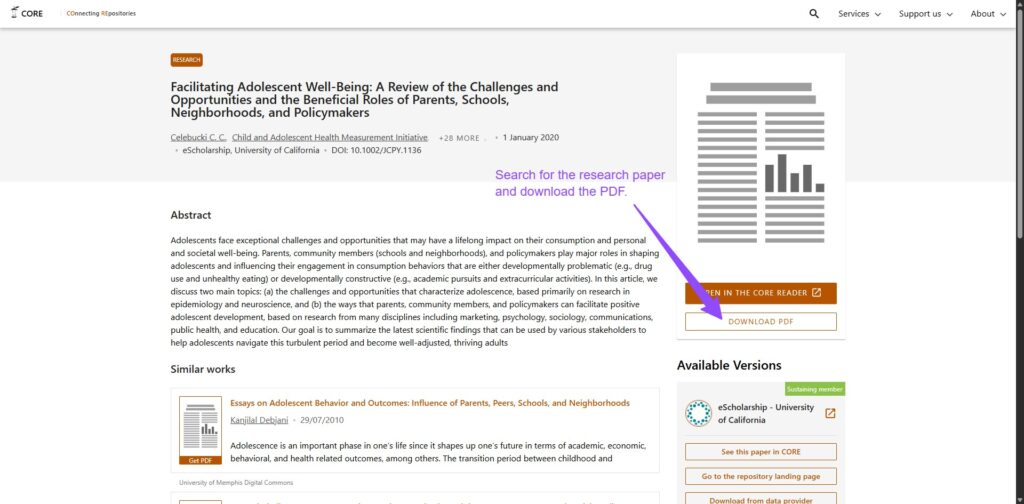
3. Best Free Repositories to Download IEEE Papers (CORE, BASE, University Repos)
If a paper was funded or authored at a university, there’s a decent chance an accepted manuscript lives in an institutional repository.
Two aggregators that surface “dark” repository deposits
- CORE (strong for repository full-text discovery)
- BASE (Bielefeld Academic Search Engine; excellent coverage of institutional repositories)
If you know the author is at (say) Imperial, Edinburgh, or Birmingham, search:
Author Name site:<institution-domain> repositoryAuthor Name "publication" filetype:pdf
You will often find an accepted manuscript that is content-identical for reading and citation purposes (even if formatting differs). This is a highly repeatable way to download IEEE papers for free without login.
4. Browser Extensions That Unlock IEEE Papers for Free (Unpaywall and LibKey)
Most people waste time manually bouncing between tabs. Extensions can surface the best available route directly on the page you’re viewing. Use the first option if you have no institutional access. Use the second option if you have a university/company login.
A. No institutional access: Unpaywall (best default)
What it does: Unpaywall scans the page for a DOI and checks whether an available copy exists in its index. If it finds one, it links you directly to that PDF.
How to use it:
- Install the Unpaywall browser extension.
- Open the IEEE Xplore page (or any page that contains the paper).
- If Unpaywall finds an available copy, click the Unpaywall indicator to open/download the PDF.
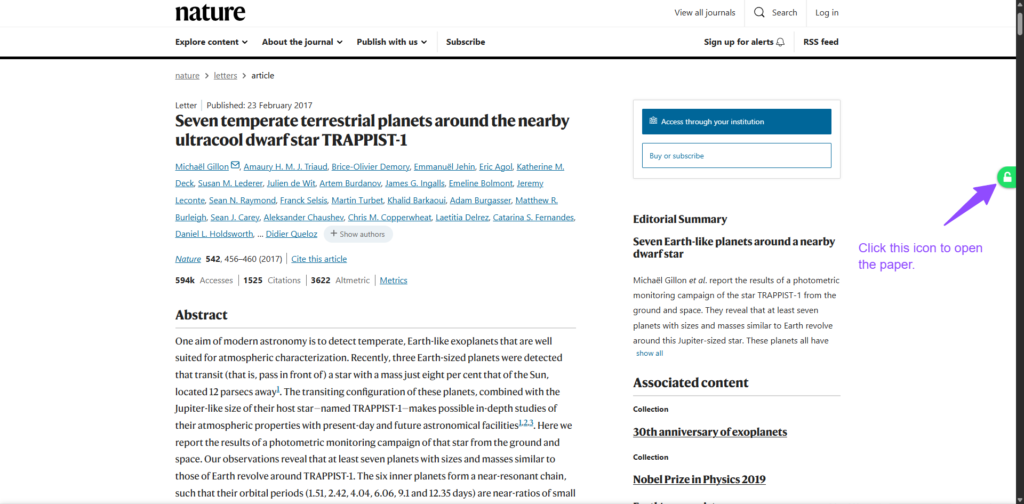
When it works: when the paper has an available version hosted on a repository or publisher page. If no available version exists anywhere public, Unpaywall won’t unlock the paywalled IEEE PDF.
B. If you have institutional access: LibKey Nomad or Lean Library
What it does: If your institution subscribes, LibKey Nomad can add a Download PDF or Link to Article button right on publisher pages and route you through the correct access path.
How to use it: Install it, select your institution if prompted, refresh the IEEE Xplore page, then click the added button and sign in if required.
Lean Library (strong alternative)
What it does: Lean Library can pop up access options when your library provides a route to the content and send you through the correct authentication path.
How to use it: Install it, choose your institution, refresh the IEEE Xplore page, then click the Lean Library prompt and sign in if required.
Why this works: A lot of “unlock IEEE papers” problems are discovery and routing problems, not “the paper is impossible to access.” These tools reduce that friction by showing the best path on the page you’re already on.
When no accessible repository copy appears, the highest-yield move is the author.
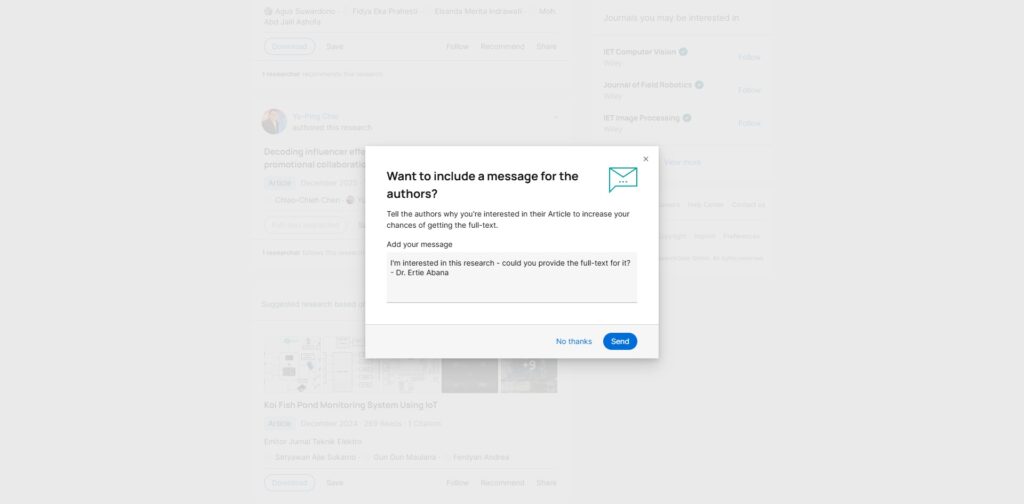
ResearchGate “Request full-text”
If the paper is listed on ResearchGate, use Request full-text and include a short note. Keep it specific and polite.
Message template (copy/paste):
Hi Dr. [Name] — I’m working through the literature on [topic] and I’m trying to read your paper “[Title]” but I don’t currently have IEEE Xplore access. If you can share any available author version (preprint/accepted manuscript), I’d really appreciate it. Thank you.
Direct email (often higher success than you’d expect)
If ResearchGate isn’t an option, email the corresponding author from:
- their university profile page
- their lab page
- the paper metadata page (if contact info is listed)
This is frequently the fastest “last mile” tactic when everything else fails.
Why IEEE Papers Are Hard to Access for Free
IEEE papers are typically behind a paywall because they are published through IEEE Xplore, which requires a subscription or institutional access. Unlike fully open-access journals, most IEEE publications restrict direct downloads.
However, many authors are allowed to share preprints or accepted manuscripts through university repositories, personal websites, or academic platforms. This is why methods like DOI searching, repository tools, and browser extensions can still help you access IEEE papers for free.
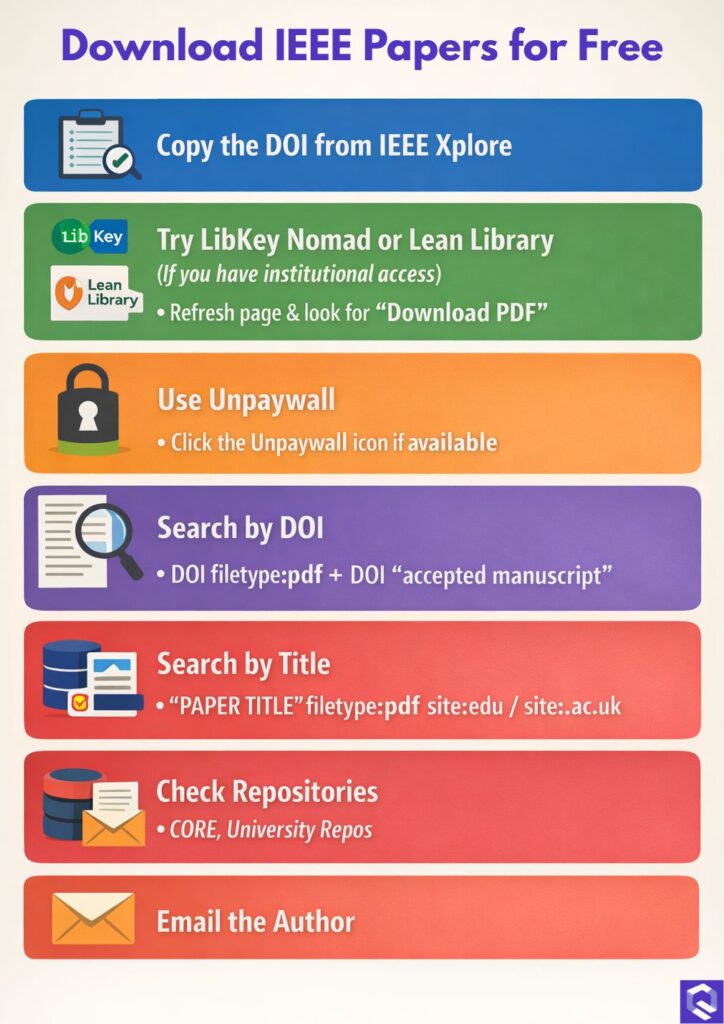
Step-by-Step: How to Download IEEE Papers for Free (Full Workflow)
- Copy the DOI from IEEE Xplore.
- If you have institutional access, try LibKey Nomad or Lean Library first (refresh the IEEE page and look for a direct “Download PDF” route).
- If you do not have institutional access, try Unpaywall (refresh the page and click the Unpaywall indicator if it finds a copy).
- Run DOI-first searches:
DOI filetype:pdf+DOI "accepted manuscript". - Run title searches:
"PAPER TITLE" filetype:pdf+"PAPER TITLE" site:.edu/site:.ac.uk. - Check repository aggregators and local repos: CORE/BASE + the author’s university repository.
- Request from the author (ResearchGate “Request full-text” or a direct email).
FAQ
How can I download IEEE papers for free without a subscription?
Start with DOI-first searching, then use filetype:pdf operator queries and institutional repository discovery (CORE/BASE). If you have any university/company affiliation, use LibKey Nomad or Lean Library to surface subscription access routes directly on IEEE Xplore.
Is IEEE Xplore free access available?
Sometimes (open access items) and often through university/company subscriptions—most failures come from not being routed through the right authentication path.
How to read IEEE papers for free when nothing shows up?
Request an author version via ResearchGate or email the corresponding author. If you’re affiliated with a library, interlibrary loan is a dependable fallback.
“Unlock IEEE papers” — what’s the best pro tactic?
DOI-first + filetype:pdf + repository aggregators + access-routing extensions is the highest-yield combination for most researchers.
Can I access IEEE papers without university login?
Yes, you can access IEEE papers without a university login by using open-access tools like Unpaywall, searching for repository versions via CORE or BASE, or requesting the paper directly from the author.
Still cannot access IEEE papers?
Don’t let paywalls slow down your thesis. Discover the 15 Best Sci-Hub Alternatives or find the perfect Libgen Alternative to source your literature today.