Learning how to use Google Scholar for research can save you hours and improve the quality of your academic work. Whether you are a student, researcher, or academic, Google Scholar helps you find reliable sources, track citations, and stay updated with the latest studies. In this guide, you will learn how to search effectively, use key features, and get the most out of Google Scholar.
What is Google Scholar and How It Works
Google Scholar is a free academic search engine that helps you find scholarly literature such as research papers, theses, books, conference papers, and patents. It is a vital tool for students and researchers to discover reliable sources, track citations, and analyse research impact.
Unlike traditional search engines, it focuses on academic and peer-reviewed content, making it an essential resource for the academic community.
Google Scholar indexes content from:
- Academic publishers
- Universities
- Online repositories
- Professional organisations
This allows you to access a wide range of credible and authoritative sources in one single place.
Using Scholar Labs for AI-Powered Research
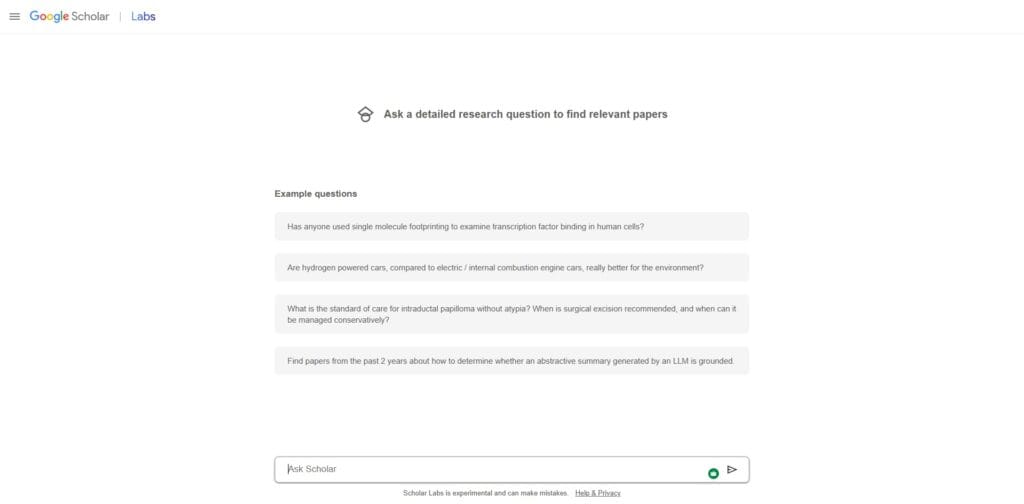
In late 2025, Google introduced Scholar Labs, a suite of AI features designed to simplify complex searches. It allows you to move beyond simple keywords and engage in conversational research.
- Conversational Queries: Instead of searching for “crop yield climate change,” you can ask, “What are the most recent findings on how rising temperatures affect wheat production in Europe?”
- AI Syntheses: Scholar Labs provides a brief overview of the consensus among top-cited papers, saving you the time of reading through dozens of abstracts to find a starting point.
How to Set Up a Google Scholar Profile
Creating a profile enables you to track your publications and citations while building your academic presence.
Steps to create your account:
- Sign in using your Google account.
- Add your name, affiliation, and research interests.
- Add your publications (automatic or manual).
- Make your profile public.
Why your profile matters:
- Helps others discover your work.
- Tracks your citation count and metrics.
- Strengthens your academic credibility.
For a complete walkthrough, see the guide on how to open a Google Scholar account.
Mastering the Google Scholar “My Library” Feature
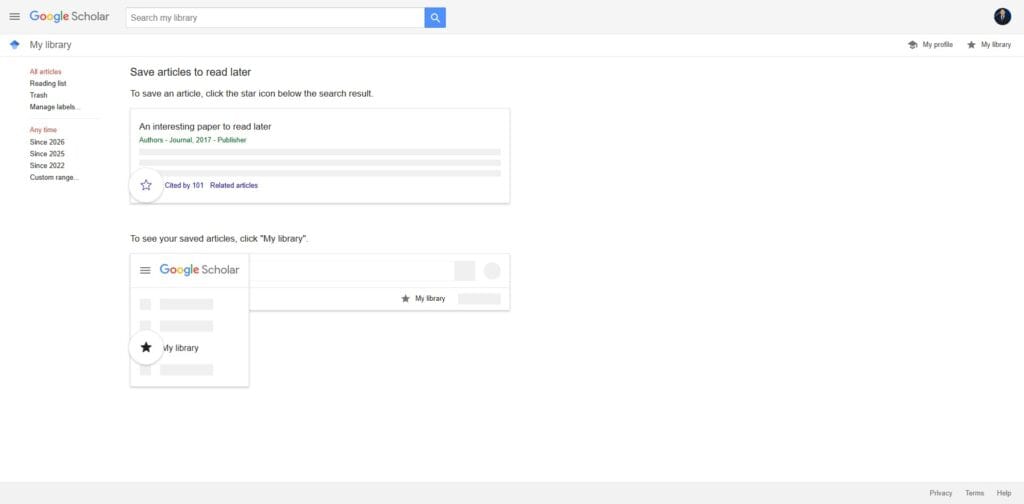
Once you have set up your profile, the “My Library” feature becomes your central hub for digital research. It is more than just a list of saved links; it’s a powerful tool for categorising years of academic work.
How to Organise Your Saved Papers
When you click the “Star” icon on a search result, the paper is saved to your library. However, if you are working on multiple projects, a single list will quickly become unmanageable. You should use labels to keep your work separated:
- Creating Labels: Within “My Library,” click on “Manage Labels” to create categories such as “Thesis Chapter 1,” “Literature Review,” or “Key Methodology.”
- Mass Exporting: You can select multiple papers at once and export them into a single file. This is essential when you are moving from the discovery phase to the writing phase of your research.
- Working Offline: Use the “My Library” settings to ensure that your saved content is accessible across devices, allowing you to transition from your desktop to a tablet or mobile phone without losing your place.
Integration with Reference Management Software
A major part of being a professional researcher is using software such as Zotero, Mendeley, or EndNote. Manually typing out citations is a waste of time and leads to errors. You can configure Google Scholar to communicate directly with these tools.
Step-by-Step Integration:
- Navigate to the Google Scholar Settings.
- Under the Search Results tab, find the Bibliography Manager section.
- Select “Show links to import citations into” and choose your preferred software (e.g., BibTeX, EndNote, or RefMan).
- Click Save.
Now, every search result will feature an “Import into [Software]” link. Clicking this will instantly move the citation data into your manager, ensuring your bibliography is 100% accurate every time.
How to Use Google Scholar for Research More Effectively
Effective searching can save significant time and improve the quality of your research.
Basic search tips:
- Use quotation marks for exact phrases.
- Focus on keywords instead of full questions.
- Search using author names for targeted results.
The “So What?”: Using quotation marks is a lifesaver when you are researching broad topics such as “Machine Learning” or “Climate Change.” Without the marks, the search engine might show any paper that mentions the word “machine” and the word “learning” separately. Forcing an exact phrase match ensures you only see papers where the concepts are linked, which can cut your search time in half.
Advanced search techniques:
- Filter by year to find recent studies.
- Search within specific journals.
- Use Boolean operators such as AND, OR, and NOT.
Example searches:
- “climate change impact agriculture”
- author:”John Smith” machine learning
Master Forward and Backward Chaining
Expert researchers do not just look at search results; they map out the “genealogy” of a topic using two specific methods:
- Forward Chaining: Click the “Cited by” link to see newer papers that have referenced the one you are reading. This helps you find the most current updates on an older theory.
- Backward Chaining: Review the reference list at the end of a paper to find the foundational studies that the author relied upon.
For more detailed strategies, explore the guide on Google Scholar advanced search.
Understanding Google Scholar Citations and Metrics
Citations are a core feature of Google Scholar and play a key role in academic evaluation.
Key metrics explained:
Citation count
Shows how many times your work has been referenced by other researchers.
h-index
Measures both productivity and impact. For example, an h-index of 10 means you have 10 papers cited at least 10 times each.
i10-index
Counts how many publications have at least 10 citations.
Professional Strategy: While high metrics are impressive, do not use them as the only measure of quality. A high citation count might mean a paper is foundational, but it could also mean it is a controversial study that others are frequently debunking. Always look at the h-index to see if a researcher has a consistent history of high-impact work rather than just one “viral” paper.
How to Use Google Scholar Alerts for Research Updates
Google Scholar alerts allow you to stay updated without repeated manual searches.
You can create alerts for:
- New papers on specific topics
- Publications by particular authors
- Citations to your work
Benefits:
- Saves time.
- Keeps you informed about the latest research.
- Helps track trends in your field.
To get started, see the full guide on Google Scholar alerts.
Best Tools and Extensions for Google Scholar
Various tools can improve your research workflow and efficiency.
The Google Scholar AI PDF Reader
The native Google Scholar PDF reader has been updated with AI-generated outlines. When you open a PDF directly in the browser, it now provides:
- One-Click Citations: Click on a citation within the text to see the full reference and “Cited by” count without leaving the page.
- Smart Outlines: Navigate through long papers instantly using the AI-generated table of contents on the left-hand side.
- Saved Annotations: You can highlight text and save comments that sync directly to your Google Scholar library.
One widely used tool is the Google Scholar Button, which allows you to quickly find papers while browsing.
Google Scholar vs Other Research Platforms
While Google Scholar is highly accessible, it is not the only research platform available.
Common alternatives:
Key differences:
- Google Scholar is free and offers broad coverage.
- Scopus and Web of Science provide more curated and accurate indexing.
- Paid platforms offer advanced filtering and cleaner data.
Each platform serves different research needs. For a detailed comparison, see Scopus vs Web of Science vs Google Scholar.
Google Scholar for Specific Academic Disciplines
One of the reasons Google Scholar is so comprehensive is that it indexes more than just standard journal articles. Depending on your field of study, there are hidden features that you should be using.
Researching Case Law and Legal Documents
For legal scholars and law students, Google Scholar is one of the most accessible databases for US state and federal court opinions. On the homepage, you can select the “Case law” radio button instead of “Articles.”
- Selecting Jurisdictions: You can filter results to specific courts or states, making it a viable free alternative to expensive databases such as Westlaw or LexisNexis.
- Cited in Opinions: Similar to the “Cited by” feature for articles, you can see how a specific court case has been referenced in later legal decisions, which is vital for understanding current legal precedents.
Medical and Life Sciences Research
In the medical field, the speed of information is critical. Google Scholar excels here by indexing “preprints”—research papers that have not yet completed the full peer-review process but contain the latest data on drug trials or disease outbreaks.
Professional Tip: Always look for the [HTML] or [PDF] tags from sources such as PubMed Central (PMC). These are often the full, open-access versions of papers that would otherwise be hidden behind a publisher’s paywall.
Because social science research often involves older, foundational texts, the “Related articles” feature is particularly useful. If you find a classic study from the 1970s, clicking “Related articles” will help you find modern interpretations and “spoke” studies that have expanded on those original theories over the decades.
How to Find Free Research Papers on Google Scholar
Finding free academic papers is one of the most common reasons people use Google Scholar. While not all articles are freely available, there are several effective ways to access full-text research.
Look for PDF Links
When you search, check the right-hand side of the results page. Many papers have direct PDF links, which usually lead to free full-text versions.
Use Institutional Access
If you are affiliated with a university or organisation, you may have access to paid journals through your institution.
Who Should Use Google Scholar
Google Scholar is designed for anyone who needs reliable academic information quickly. Its features benefit multiple user groups:
Students
- Find scholarly sources for essays, dissertations, and projects.
- Access PDFs and preprints for free.
- Track how often a paper has been cited to identify influential studies.
Researchers
- Quickly identifying the most relevant literature in their field.
- Tracking citations to measure impact.
- Staying updated with new publications using alerts.
Academics
- Google Scholar helps in curriculum development by locating credible sources.
- Assists in monitoring research trends and top publications.
- Provides tools to manage personal publication profiles.
Common Mistakes When Using Google Scholar
Even experienced users can fall into pitfalls that reduce efficiency or accuracy:
Using Full Questions Instead of Keywords
Typing full questions like “What are the effects of climate change on agriculture?” may produce fewer relevant results. Instead, use keywords:
climate change agriculture impact
Ignoring Filters
Google Scholar offers filters by year, author, and journal. Not using them can leave you overwhelmed with outdated or irrelevant results.
Trusting All Sources Blindly
Google Scholar includes both peer-reviewed and non-peer-reviewed content. Always verify the credibility of journals and authors before citing.
Google Scholar Search Examples
Here are real queries to inspire your own research:
"machine learning healthcare"– finds studies applying AI in medicine."climate change policy impact"– locates papers on environmental regulations."renewable energy adoption economics"– targets research on energy policy and adoption.author:"Jane Doe" deep learning– searches for papers by a specific researcher."social media misinformation" 2022..2025– limits search by recent years.
Pro Tips for Using Google Scholar Efficiently
To get the most out of Google Scholar, apply these practical strategies:
- Start Broad, Then Refine: Begin with general keywords, then narrow your search using filters and specific terms.
- Use “Cited by” to Find Key Papers: Highly cited papers are often influential. Use the “Cited by” feature to discover important research in your field.
- Follow Top Authors: Search for leading researchers and explore their publications to stay updated with high-quality work.
- Combine Multiple Databases: Do not rely on one platform. Use Google Scholar alongside other academic tools such as Scopus and Web of Science.
- Use Alerts to Stay Updated: Set up alerts for topics and authors so you never miss new research.
- Organise Your Research: Use citation tools and reference managers to keep track of papers and sources.
The Ethics of Research: Spotting Predatory Journals
As a Hub for research information, it is important to address the “quality vs quantity” debate. Because Google Scholar indexes the web broadly, it occasionally includes content from “predatory journals.” These are publications that charge authors a fee to publish without providing proper peer review or editorial oversight.
How to Verify a Source
To maintain the integrity of your research, you should follow these three steps for any unfamiliar source found on Google Scholar:
- Check the Publisher: Is the journal published by a recognised university press or a reputable organisation such as Elsevier, Wiley, or Springer?
- Analyse the Metrics: Use the Google Scholar Metrics tab to see where the journal ranks in its category. If it is not listed or has zero impact, proceed with caution.
- Cross-Reference with Scopus: If you are unsure, check if the journal is indexed in Scopus or the Web of Science. These platforms have stricter entry requirements than Google Scholar.
Dealing with Broken Links and Paywalls
It is frustrating to find the perfect paper only to find that the link is broken or the article is behind a $40 paywall. If the institutional access method fails, try these “insider” strategies:
- The “All Versions” Link: Underneath the search result, click on the “All [Number] versions” link. Often, one of those versions is a PDF hosted on the author’s personal university page.
- Contact the Author: Most researchers are happy to share their work for free if you email them directly. They do not receive any money from the publisher’s paywall, so they usually have no reason to deny your request.
Conclusion
Google Scholar remains one of the most accessible and powerful tools for academic research. By learning how to search effectively, understand citations, and use its features properly, you can significantly improve your research process. Whether you are a student or an experienced researcher, mastering Google Scholar will help you find better sources, stay informed, and strengthen your academic work.
Frequently Asked Questions
Is Google Scholar free to use
Yes, Google Scholar is completely free to use. However, some papers may require payment unless accessed through a university or open-source platform.
Is Google Scholar reliable for research
Google Scholar is generally reliable because it indexes academic sources, but it also includes non-peer-reviewed content. It is best to evaluate sources carefully.
How do I find free papers on Google Scholar
You can find free papers by clicking PDF links on the right side, using institutional access, or searching for preprints and author-uploaded versions.
What is the difference between Google Scholar and Google
Google Scholar focuses on academic content, while Google searches the entire web, including blogs, news, and commercial websites.
How do citations work in Google Scholar
Citations show how many times a paper has been referenced by other researchers, helping measure its academic impact.