Prepostseo brings several AI tools together to support writers who want to write natural, unique, and quality content. The platform helps creators with regular writing tasks, making each of its tools practical and useful.
From summarizing dense text to generating structured paragraphs, improving tone, correcting grammar, and ensuring originality, Prepostseo makes writers more efficient. Writers don’t just improve their writing but also get a sense of satisfaction knowing their work is clear and helpful.
This review explains how Prepostseo‘s AI tools strengthen your content and why they fit well into a modern writing workflow. So keep reading!
AI Text Summarizer
Content writers often go through long guides during the research process, as they need to extract important information. This is a hectic process that requires a lot of time and effort. Prepostseo’s AI Text Summarizer can help by condensing those long guides and pulling out the key information in no time.
Demonstration:
I pasted a lengthy text into the tool and chose my desired length for the output. You can also paste or upload text as a file and then adjust the length of the summary according to your needs. Once I hit the “Summarize” button, the AI-powered tool instantly converted the text into a concise summary, retaining only the main points. You can see the output provided by the tool in the following screenshot.
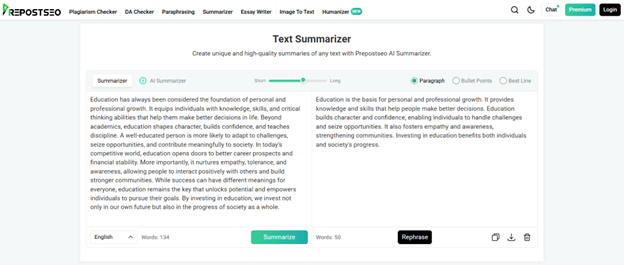
Once the summary was generated, the tool also provided me with an option to pull out the best line or convert it into bullet points. I decided to try its ‘Bullet Points’ feature. Here’s the tool’s output:
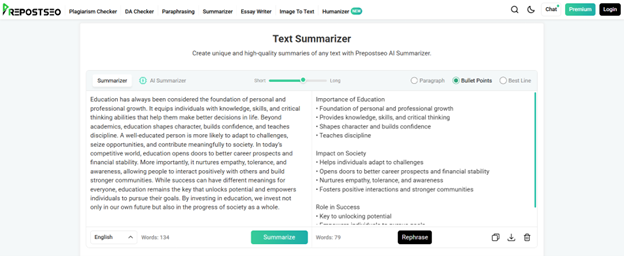
This feature can become especially handy when you have written a tutorial or procedure and feel that it’s too wordy. Use the tool to convert it into simple bullet points. This makes every step easy to follow for the readers and keeps them on track.
By summarizing long texts, writers can easily focus on the main information rather than wasting time reading every single detail. The tool can also be used by writers to remove unnecessary fluff from their own content, making it concise, clear, and to the point.
Features
- Freemium tool
- Input options: type, paste, and file upload
- Two different summarizing modes
- Offers summary length adjustment
- Can extract the best line and bullet points
- Supports 10+ languages
Important note:
While summarizing, extremely short outputs might skip context, so always adjust the summary length to a level that preserves the message. Provide the text that is free of grammar mistakes to ensure accurate summaries. If your original text contains numbers or specific entities, then cross-check the information.
AI Paragraph Generator
Sometimes, a certain topic or section may feel difficult to start. Writers may have the right ideas but struggle to frame them into the right words. They can easily get frustrated in such circumstances. Here, Prepostseo’s AI Paragraph Generator can help by generating uniform and unique paragraphs with a simple prompt.
Demonstration:
I entered my topic in the input box and selected the writing length to be ‘Concise’. You can also choose the ‘Detailed’ option if you want the paragraphs to be more descriptive. The tool gives the option to generate 1, 3, or 5 paragraphs in one attempt. I opted to generate 5 paragraphs to see the maximum output of the tool. Finally, I chose the tone to be Standard before pressing the ‘Generate Paragraph’ button. You can also choose the tone to be Narrative, Descriptive, Expository, or Persuasive.
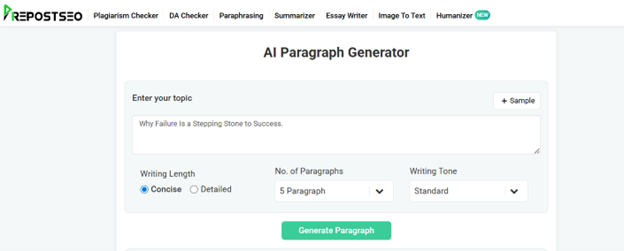
That’s all I had to do in order to generate well-structured paragraphs on my topic.
As you can see in the following screenshot, the tool generated 5 comprehensive paragraphs, covering all the important points related to my topic. The thing I liked the most was how well the ideas in each paragraph were connected to one another.
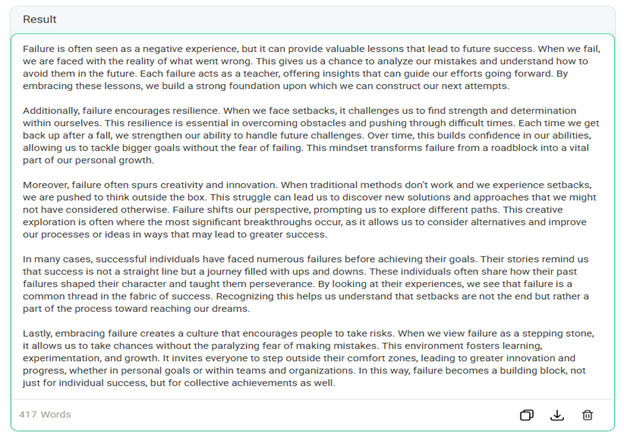
This is especially useful when you need a starting point to overcome writer’s block. The tool also becomes practical when you want several variations of the same idea, so you can compare them and refine your final version. With multiple writing tones offered by the tool, you can also test different styles until the paragraphs match your content’s purpose.
Features
- Free to use
- Writes in 5 different tones
- Writing length adjustment
- Uses AI and LLMs
- Can generate up to 5 paragraphs at once
Important note:
Make sure to give a complete, detailed prompt to the tool. Otherwise, it may generate vague or general paragraphs. Check it for context, and verify the claims and data for factual accuracy as well.
AI Humanizer
Many writers often use AI to write efficiently. It is an effective way to boost productivity. AI can write helpful content, but it may sound stiff, robotic, and overly polished. Prepostseo’s AI Humanizer refines stiff content, making it more engaging, organic, and reader-friendly.
Demonstration:
Using this tool is very simple. I pasted AI text into the tool and chose the ‘Light’ mode. It also provided me with an option to upload text as a file, and an ‘Advanced’ mode for humanizing. Then, I clicked the “Humanize Text” button. The tool instantly provided me with human-like text that sounds friendly, engaging, and has a more conversational tone.
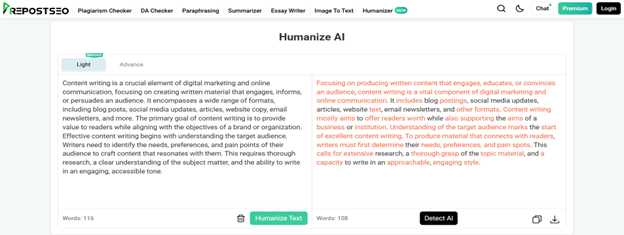
As you can see in the screenshot, the tool humanized the input in a way that reduced the typical AI patterns and made it sound more organic without changing its core meaning. It also improved sentence rhythm and made the text easier to read.
This is especially helpful for blogs, product descriptions, or other similar types of content where authenticity matters. When content sounds organic, people trust it more, which may lead to better engagement.
Features
- Freemium tool
- Simple to use
- Input options: write, paste, and file upload
- Two humanizing modes: Light and Advance
- Available in English, Spanish, and French languages
Important note:
AI humanizing tools can remove robotic patterns, but they cannot replace the depth that real writers add. Enhance the output by including personal examples, emotional cues, or creative angles to make the content feel fully authentic.
Grammar Checker
Initial drafts are never perfect. Even a well-researched writing might contain grammar or spelling errors. Such mistakes can weaken your content’s credibility, and it may sound unprofessional. An even harder part is to identify them, as they can easily go overlooked. That’s when Grammar Checker by Prepostseo becomes really helpful. It doesn’t just highlight those mistakes but also fixes them instantly.
Demonstration:
To see how effectively the tool determines and fixes grammar errors, I pasted a small paragraph into its input field. You can type, paste, or upload the text as a file as well.
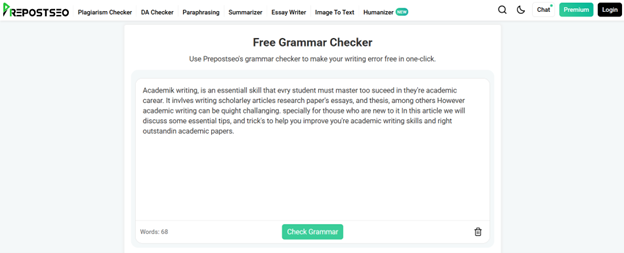
Then, I clicked the ‘Check Grammar’ button, and the tool asked me to fill in the captcha before highlighting spelling and punctuation mistakes.
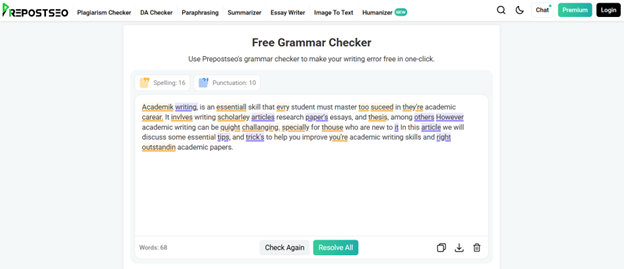
Then, there were two options for me: fix all of them at once or go one by one. I hit the “Resolve All” button to see if it really fixes all the errors in just one click. The tool took even less than a second and fixed all the grammar mistakes automatically. You can see the error-free version of my paragraph in the following screenshot.
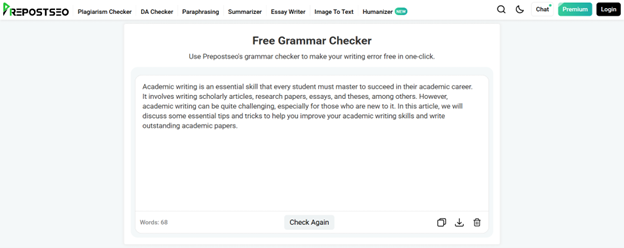
This Grammar Checker becomes practical in the proofreading stage as it saves a lot of time and effort. When your writing is free of grammar mistakes, it’s easier for readers to understand it. An error-free content is what separates quality content from weaker ones.
Features
- Free to use
- Allows inputting up to 1000 words (in one attempt)
- Input options: type, paste, or file upload
- Supports multiple languages
- Auto language detection
- Can fix all errors in just one click
Important note:
Don’t always rely on automatic fixes. It’s advised to thoughtfully review suggestions. Grammar checking tools may sometimes miss nuances that can go against your intended meaning, so always review for the context.
Plagiarism Checker
Content originality is one of the most important elements of writing. Sometimes, unintentional similarities may affect the integrity of your work. Hence, every writer must ensure that their work is original, especially research-based content that carries citations. Prepostseo’s Plagiarism Checker comes to your help by scanning your text against online sources for any matching instances.
Demonstration:
To use it, I pasted a text of around 350 words into the tool. You can upload text in a file as well.
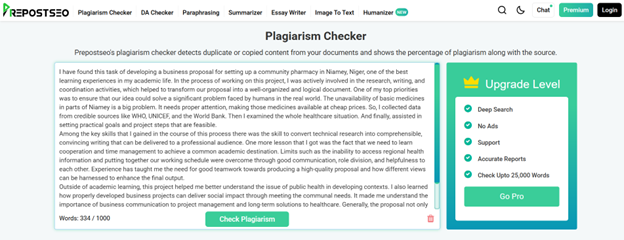
When I clicked the “Check Plagiarism” button, the tool instantly analyzed the text before providing an exact percentage of uniqueness and plagiarism in the content.
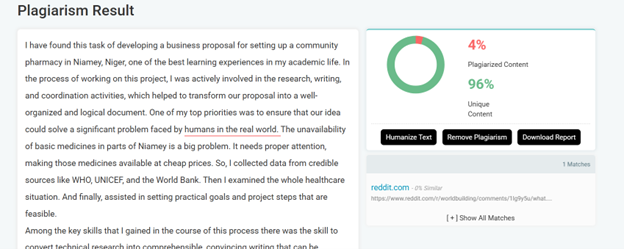
As you can see in the above screenshot, the tool found one match and highlighted the exact plagiarized phrase. The tool also provided the source link, which helped me verify where the match came from.
Once the tool highlights the matching phrase, you can rewrite it to eliminate any chances of plagiarism. This way, you can ensure that your writing stays completely original.
The input word limit for Prepostseo’s Plagiarism Checker varies depending on the users. Free users with a login can scan up to 1500 words in one go. While premium users can upload up to 25000 words, depending on the type of plan they purchased. The tool also provides a downloadable plagiarism report in PDF and HTML formats.
Features
- Both free and premium versions available
- Deep research and accurate reports
- Allows inputs of up to 25000 words (depends on your plan)
- Exact percentages of plagiarized and unique content
- Offers ‘paste text’ and ‘file upload’
Important note:
A high similarity percentage doesn’t always mean that your content is plagiarized or copied. It means that some of your phrases are similar to others found online. Sometimes, specific entities or fixed terms are unchangeable, so carefully review each line highlighted by the tool. Also, for research-based work, exclude the bibliography from your text while checking plagiarism.
Final Thoughts
With the use of Prepostseo’s AI tools, writers can become more productive. They can focus more on the creative part of writing, as the repetitive and time-consuming writing tasks can be entrusted to these tools.
However, AI tools should always be used thoughtfully without overreliance. They should be treated as helping partners while keeping your own voice and creativity intact. When used this way, they not only improve content writing but also make you more efficient.