
Navigating the vast sea of academic literature can be overwhelming without the right assistance. While the search engine itself is powerful, using the best Google Scholar extensions is what transforms a standard search into a professional research workflow. In 2026, these tools have evolved beyond simple citation buttons to include AI-powered reading assistants and seamless library integrations. This guide highlights the essential extensions you need to find, save, and organise your research with maximum efficiency.
What are Google Scholar Extensions?
Google Scholar extensions are browser-based applications that integrate directly with your search experience. They act as a bridge between the broad web and the specific academic data you need. By using these extensions, you can significantly reduce the time spent on administrative tasks such as manual citation entry or hunting for open-access PDFs.
These extensions are designed to:
- Accelerate Discovery: Search for papers while reading a blog post or news article.
- Automate Citations: Export perfectly formatted references to your library.
- Verify Impact: View citation counts and h-index data in real-time.
Official Google Scholar Extensions
Google provides two primary extensions that are essential for any serious academic. These official tools are designed to integrate seamlessly with the search engine and your browser to speed up the discovery and reading process.
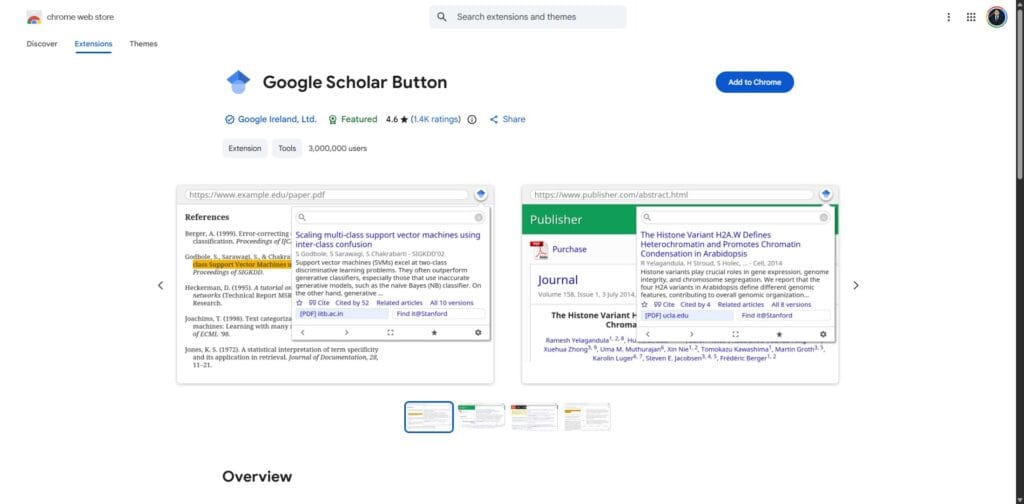
The Google Scholar Button is the most important official extension in this list. It is a free tool available for Chrome, Firefox, and Edge that puts a miniature version of the search engine in your browser toolbar. It allows you to carry the power of academic search with you as you browse news sites, blogs, or other databases.
Key Features and How to Use Them:
- Instant Search: Highlight any text on a webpage and click the button to see the top three related search results in a small popup.
- Quick Citation: Click the “Quote” icon within the popup to copy a citation in MLA, APA, or Chicago format without opening a new tab.
- Full-Text Discovery: The extension will often show a [PDF] link if a free version of the article exists on the web.
To use it effectively, you should pin the extension to your browser bar. When you are reading a paper that mentions a specific theory, highlight the theory name and click the button to find the foundational paper immediately.
2. The Google Scholar PDF Reader
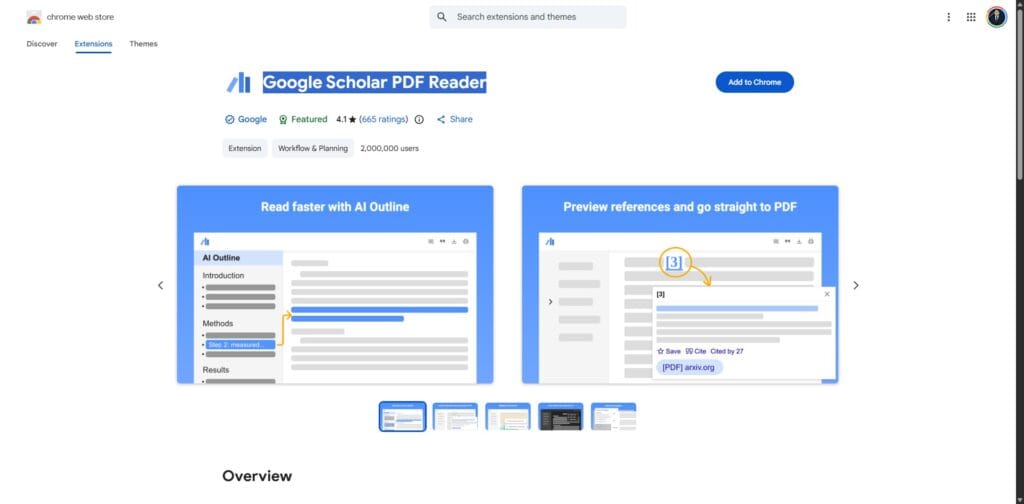
In 2026, the official PDF reader has been updated with powerful AI capabilities. It is built directly into the browser and activates whenever you open a Scholar-indexed document. You can find more details about these specific features in our guide on how to use Google Scholar for research.
This official tool allows you to:
- Navigate via Smart Outlines: Jump to the “Methodology” or “Results” section instantly using an AI-generated table of contents.
- Interactive Citations: Click a citation within the PDF to see its “Cited by” count and save it to your library without leaving the page.
- Saved Annotations: Highlight text and add notes that sync directly to your Google Scholar library.
Looking for more powerful tools? Explore our guide to the best Chrome extensions for research to further enhance your workflow.
Tips for Using Google Scholar Extensions Efficiently
Using Google Scholar extensions effectively is not just about installing them. It is about creating a streamlined workflow that saves time and reduces distractions. These best practices will help you get the most value from the official tools.
- Consolidate Your Extensions: Focus on the official Google Scholar tools to keep your workflow simple and efficient. Installing too many extensions can slow down your browser and create unnecessary overlap in features.
- Use Library Links: Always ensure your library links are configured in your Google Scholar settings. This allows you to access institution-supported full texts directly from search results.
- Pin and Use Regularly: Keep the Google Scholar Button pinned to your browser toolbar so it is always accessible. This encourages consistent use and speeds up your research process.
- Audit Your Extensions: Every six months, review and remove extensions that you no longer use. This keeps your browser fast and reduces potential conflicts between tools.
- Check for Updates: Ensure your tools are updated to the latest versions. Updates often include performance improvements, bug fixes, and compatibility with changes in academic platforms.
Final Thoughts
Google Scholar extensions are essential for modern researchers. By focusing on the official tools such as the Google Scholar Button and the integrated PDF reader, you can simplify your workflow and improve efficiency. Using these tools allows you to focus more on research and less on administrative tasks.
Ready to master Google Scholar for your research?
Finding a single paper is helpful, but mastering the entire platform is essential for a successful literature review. If you are navigating your own research journey, explore our comprehensive guide on
How to Use Google Scholar for Research.
Frequently Asked Questions
Yes, the Google Scholar Button is a completely free extension provided by Google. You can install it from the Chrome Web Store or Firefox Add-ons.
The Google Scholar Button allows you to search for academic papers instantly while browsing any webpage. You can highlight text, find related research, and generate citations without leaving the page.
What is the Google Scholar PDF Reader?
The Google Scholar PDF Reader is an integrated tool that enhances how you read academic papers. It includes features such as AI-generated outlines, interactive citations, and saved annotations.
Do Google Scholar extensions work on mobile devices?
Most browser extensions do not work on mobile versions of Chrome or Safari. It is recommended to use Google Scholar extensions on a desktop browser for full functionality.
How can I use Google Scholar extensions more efficiently?
You can improve efficiency by pinning the Google Scholar Button to your browser toolbar, enabling library links in your Scholar settings, and regularly updating your browser extensions.