
• Privacy Policy
  • About
  • Contact
Email Us
Qubic Research
  • Home
  • Research Tools
  • Research Guides
  • Research Gear
  • Resources
    • Request a Research Paper
    • Journal Finder
    • Research Insights
    • Research Topics
No Result
View All Result
Qubic Research
No Result
View All Result
Home Research Tools

ResearchRabbit vs Connected Papers (2026): Which Is Better?

Dr Ertie Abana by Dr Ertie Abana
21/04/2026
in Research Tools
517
SHARES
1.3k
VIEWS
Share on FacebookShare on Twitter

Choosing between ResearchRabbit vs Connected Papers in 2026 comes down to one key question: do you need a tool for ongoing literature discovery, or a fast way to map a research topic from a single paper? After using both across different research workflows, the difference is clear: ResearchRabbit is built for long-term, iterative research, while Connected Papers is designed for speed and immediate visual context.

Quick Answer: Which is better for literature reviews, ResearchRabbit or Connected Papers?
Choose ResearchRabbit for ongoing literature reviews, tracking authors, and building long-term collections. Choose Connected Papers for rapid, one-off visual mapping of a specific topic using a single seed paper. ResearchRabbit is built for iterative workflows, whereas Connected Papers focuses on speed and immediate context.

Dr Ertie’s Quick Verdict

  • Choose ResearchRabbit if you want ongoing discovery, the ability to build collections, track topics or authors over time, and a workflow that supports longer research projects.
  • Choose Connected Papers if you want fast, one-off exploration from a seed paper and a clean visual map to understand the neighbourhood around a topic.

Which tool should you use for different research tasks?

Choosing between ResearchRabbit and Connected Papers depends on how you actually work. This quick comparison shows which tool performs best for common research scenarios.

Use caseBest toolWhy it wins
Literature reviews (ongoing)ResearchRabbitSupports collections, saved papers, and iterative discovery over time
Exploring a new topic quicklyConnected PapersInstant visual graph from a single seed paper with minimal setup
Finding seminal papersConnected PapersHighlights the core cluster of highly connected and influential papers
PhD or long-term researchResearchRabbitBetter for tracking authors, topics, and building structured workflows
Multi-topic or interdisciplinary researchResearchRabbitAllows organisation across multiple collections and evolving directions
Quick scoping before writingConnected PapersFastest way to understand a research area without setup

What is ResearchRabbit and how does it work?

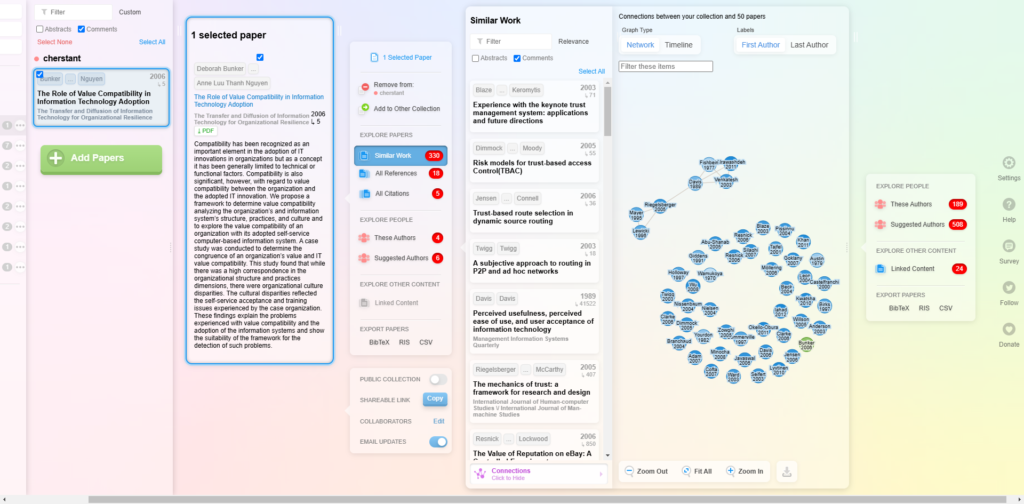
ResearchRabbit interface example

Research Rabbit helps you discover papers by building an evolving map around authors, citations, and topics. It’s designed for researchers who want to explore broadly, save what matters, and return to a project repeatedly without restarting from scratch.

  • Early results can feel noisy until you build a well-curated starting collection.
  • Managing large collections can become cluttered if you do not organise them carefully.

Key features

  • Discovery by author/topic/paper: Start from what you know and expand outwards.
  • Interactive research maps: Visualise relationships across papers and authors.
  • Collections and organisation: Save papers into libraries/collections for ongoing projects.
  • Citation-based exploration: Follow ideas forward and backward through related work.
  • Sharing: Share collections with collaborators (useful in labs or student-supervisor workflows).

Who is Research Rabbit best for?

  • Students building literature reviews and trying to understand a research area systematically.
  • PhD candidates who need repeated exploration over months, not minutes.
  • Researchers tracking a topic or author network over time.
  • Interdisciplinary work where you need to branch into neighboring fields and connect clusters.

Pros and cons

Pros

  • Strong for ongoing discovery and iterative research workflows.
  • Good organisation via collections (less “lost tabs” and duplicated searching).
  • Exploration feels “guided” once you build a starting library.

Cons

  • There is a noticeable learning curve—especially when setting up your first collections and understanding how recommendations evolve over time.
  • Results quality can depend on your starting seed papers and how well you curate early.
Author’s Tip: Connect ResearchRabbit to Zotero to synchronise your existing library. In 2026, using your full collection as a combined seed allows the platform to provide the most personalised recommendations for new peer-reviewed articles.

What is Connected Papers and how does it work?

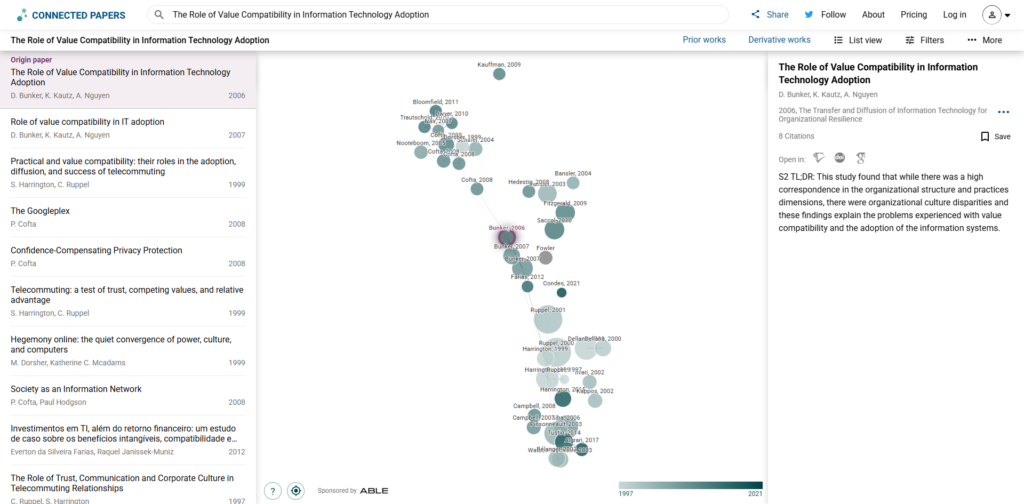
Connected Papers graph example


Connected Papers generates a visual graph of papers related to a starting point (usually a key seed paper). It’s built for speed: paste a paper, get a map, and instantly see the “neighborhood” of closely related research.

  • The quality of results depends heavily on your seed paper—weak inputs lead to less useful graphs.
  • It becomes limiting once you need to track or organise papers beyond a single exploration session.

Key features

  • Graph generation from a seed paper: A fast way to discover a cluster of related research.
  • Interactive visualisation: Click through nodes to inspect papers and expand context.
  • Paper overview: Quickly scan authors, year, and basic metadata for decision-making.
  • Simple workflow: Minimal setup, low friction, ideal for quick exploration.

Who is Connected Papers best for?

  • Researchers exploring a new topic and needing immediate context around a foundational paper.
  • Students who want to understand the landscape before committing to a direction.
  • Fast scoping: When you need to identify clusters and key papers quickly.

Pros and cons

Pros

  • Extremely fast to use—great for quick scoping.
  • Clean graphs that make paper neighborhoods easy to understand.
  • Excellent “starting tool” when you only have one strong seed paper.

Cons

  • Less suited to long-term project management (collections/workflow depth varies).
  • Best results often require a high-quality seed paper; weak seeds can produce noisy maps.
Author’s Tip: Utilise the Prior Works and Derivative Works features in Connected Papers to find foundational studies and recent reviews. This is the quickest way to map a research field when you only have one strong seed paper.

ResearchRabbit vs Connected Papers: Key differences explained

1. Research workflow: ongoing discovery vs quick mapping

In practice, these tools are built for completely different stages of research.

  • ResearchRabbit becomes more valuable the longer you use it. Once you start building collections, following authors, and revisiting topics, it develops into a structured workflow where discovery improves over time. It is designed for researchers who return to the same project repeatedly.
  • Connected Papers delivers most of its value immediately. You paste in a strong seed paper and get a clear visual map within seconds. This makes it ideal for quick orientation, but there is less depth once you move beyond that initial graph.

2. Discovery and citation exploration

  • ResearchRabbit supports deeper, iterative exploration. As you refine your collections and interact with the tool, recommendations tend to become more relevant. However, early results can feel noisy if your starting papers are not well chosen.
  • Connected Papers is more dependent on the quality of your seed paper. With a strong input, it can reveal highly relevant clusters and relationships quickly. With a weak one, the graph can become less useful and harder to interpret.

3. Visualisation and clarity

  • ResearchRabbit offers a more interactive but slightly more complex experience. It is better suited to managing ongoing projects, but it can feel less intuitive at the beginning, especially when navigating larger collections.
  • Connected Papers focuses on simplicity and clarity. The graphs are clean and easy to understand, making it one of the fastest ways to grasp a research landscape. The trade-off is that the visualisation is less flexible for deeper, long-term use.

4. Collaboration and sharing

  • ResearchRabbit is better suited to collaborative research workflows. Sharing collections and building a structured library makes it useful for teams, labs, and student–supervisor work.
  • Connected Papers is primarily an individual exploration tool. It is designed for quickly generating insights rather than managing shared research over time.
Author’s Experience: After using both tools across multiple research workflows, a clear pattern emerges. Connected Papers is extremely useful at the beginning of a project, especially when you only have one or two strong papers. However, as soon as the research expands, it becomes harder to manage and revisit findings. ResearchRabbit, on the other hand, feels slower at first but becomes significantly more powerful over time. Once you build collections and follow authors or topics, it starts to surface more relevant papers and supports a much more structured workflow.

ResearchRabbit vs Connected Papers pricing (2026): free plans and paid options

Why this matters: Researchers frequently search for updated pricing and free-tier limitations to determine which tool fits their long-term project budgets. While both platforms offer free entry points, the functional caps, particularly regarding “seed” articles and monthly graph generation, are the primary factors that necessitate an upgrade. Pricing details have been verified for the current 2026 academic year.

ItemResearchRabbitConnected Papers
Free Plan$0 (Free Forever) — Unlimited searches across 280M+ articles, 1 project, and up to 50 seed articles per search.$0 (Free) — Access to all features but limited to 5 new graphs per month.
Paid PlansRR+ — $10/month (billed annually) or $12.50/month. Supports 300 seed articles and multiple projects.Academic — $6/month (billed $72 annually).
Business — $20/month (billed $240 annually).
Typical LimitationsFree users are restricted to a single project and a lower cap on seed inputs for large-scale discovery.The monthly graph limit is the main barrier; once 5 graphs are created, users must wait for the next month or upgrade.

ResearchRabbit offers “Country Parity Pricing,” providing significant discounts for researchers in over 100 qualifying countries.

Which is easier to use: ResearchRabbit or Connected Papers?

ResearchRabbit

  • More powerful but slightly more complex, especially when setting up your first collections and understanding how recommendations evolve.
  • Becomes significantly easier to use once your workflow is established, particularly for long-term literature reviews and ongoing projects.
  • Better suited for users who are willing to spend a little time organising their research structure upfront.

Connected Papers

  • Extremely quick to learn, with almost no setup required.
  • You can generate a useful graph within seconds, making it ideal for fast exploration of a new topic.
  • More intuitive for first-time users who just want a visual overview without building a system.

ResearchRabbit vs Connected Papers: common mistakes to avoid

  • Using a weak seed paper in Connected Papers: this often results in loosely connected or irrelevant graphs, which can mislead your understanding of a research field.
  • Not curating collections early in ResearchRabbit: without proper organisation, recommendations can become scattered and harder to manage over time.
  • Expecting both tools to behave the same way: Connected Papers is designed for quick visual mapping, while ResearchRabbit is built for long-term discovery workflows. Using them interchangeably leads to poor results.
  • Relying only on one graph or one collection: in both tools, deeper insight comes from iterating and expanding your search, not stopping at the first result.

Conclusion: Which should you choose in 2026?

For most researchers, ResearchRabbit is the better choice. It is built for ongoing discovery, making it far more effective for literature reviews, long-term projects, and any workflow where you need to organise and revisit your research over time.

Connected Papers is best used as a starting tool. It excels when you have a strong seed paper and want to quickly understand the surrounding research, but it becomes more limited as your project grows.

In practice, the difference comes down to depth versus speed. ResearchRabbit becomes more useful the longer you use it, while Connected Papers delivers immediate value but less long-term flexibility.

If you are building a serious research workflow, start with ResearchRabbit. If you need a fast way to explore a topic from one paper, use Connected Papers.

Want to speed up your literature review?

If you’re building a faster research workflow, read our step-by-step guide: Best Tools for Literature Review to Speed Up Your Research.


FAQ: ResearchRabbit vs Connected Papers

Which is better for literature reviews: ResearchRabbit or Connected Papers?

For most literature reviews, ResearchRabbit is the stronger choice because it allows you to build collections, track papers over time, and expand your research iteratively. Connected Papers is better suited for quickly mapping a field from a single strong seed paper, especially in the early stages of exploration.

Is ResearchRabbit free to use?

ResearchRabbit offers a free plan with core features for discovering and saving papers. There is also a paid plan (RR+) with higher limits and additional features such as expanded collections and advanced workflow options. Pricing and limits may change, so it is best to confirm details on the official website.

Is Connected Papers free or paid?

Connected Papers offers a free tier with limited monthly graph generation, which is useful for occasional exploration. Paid plans remove these limits and are better suited for frequent use or academic research workflows. Always check the latest pricing details on the official site.

Do I need an account to use ResearchRabbit or Connected Papers?

Both tools may require an account for saving work, building collections, or syncing data across sessions. While basic exploration may be possible without full setup, creating an account is recommended if you want to store research and revisit it later.

Which tool is better for finding seminal or foundational papers?

Connected Papers is often better for quickly identifying foundational papers because it visualises closely related research clusters around a seed paper. However, ResearchRabbit is stronger for long-term discovery, helping you uncover influential work across authors and citation networks over time.

Can I export references to Zotero or BibTeX?

Export options depend on the tool and subscription level. Both ResearchRabbit and Connected Papers may support citation export features, but availability can vary. If citation management is important for your workflow, it is best to verify current export formats directly on their official documentation pages.

Table of Contents
1. Dr Ertie’s Quick Verdict
2. Which tool should you use for different research tasks?
3. What is ResearchRabbit and how does it work?
3.1. Key features
3.2. Who is Research Rabbit best for?
3.3. Pros and cons
4. What is Connected Papers and how does it work?
4.1. Key features
4.2. Who is Connected Papers best for?
4.3. Pros and cons
5. ResearchRabbit vs Connected Papers: Key differences explained
5.1. 1. Research workflow: ongoing discovery vs quick mapping
5.2. 2. Discovery and citation exploration
5.3. 3. Visualisation and clarity
5.4. 4. Collaboration and sharing
6. ResearchRabbit vs Connected Papers pricing (2026): free plans and paid options
7. Which is easier to use: ResearchRabbit or Connected Papers?
7.1. ResearchRabbit
7.2. Connected Papers
8. ResearchRabbit vs Connected Papers: common mistakes to avoid
9. Conclusion: Which should you choose in 2026?
9.1. Want to speed up your literature review?
10. FAQ: ResearchRabbit vs Connected Papers
10.1. Which is better for literature reviews: ResearchRabbit or Connected Papers?
10.2. Is ResearchRabbit free to use?
10.3. Is Connected Papers free or paid?
10.4. Do I need an account to use ResearchRabbit or Connected Papers?
10.5. Which tool is better for finding seminal or foundational papers?
10.6. Can I export references to Zotero or BibTeX?

Subscribe to Our Newsletter

Oh hi there 👋
It’s nice to meet you.

Sign up to receive awesome content in your inbox, every week.

We don’t spam! Read our privacy policy for more info.

Check your inbox or spam folder to confirm your subscription.

Popular Posts

Research Guides

How to Make AI Writing Sound Natural: Humanize Your Text

by Dr Ertie Abana
20/05/2026
0

I know the frustration of looking at an AI-generated draft that contains great points but reads with the cold, lifeless...

Read moreDetails

How to Make AI Writing Sound Natural: Humanize Your Text

How to Avoid AI-Sounding Academic Writing: Pure Human Prose

How to Use AI Without Plagiarism: Ethical Writing Rules

Does Copy-Pasting From ChatGPT Get Detected? Portal Traps Exposed

Does Paraphrasing Reduce AI Detection? Truth About Rewriting

AI Detector Flagged My References: How to Fix False Positives

Load More
Qubic Research

Welcome Researchers! I’m Dr Ertie Abana, and I’m here to assist with your academic journey. Explore my collection of guides, AI resources, and proven techniques designed to enhance your research skills and daily productivity.

Sign Up For Updates

Subscribe to our mailing list to receive daily updates direct to your inbox!


Recent Posts

  • How to Make AI Writing Sound Natural: Humanize Your Text
  • How to Avoid AI-Sounding Academic Writing: Pure Human Prose
  • How to Use AI Without Plagiarism: Ethical Writing Rules
  • Does Copy-Pasting From ChatGPT Get Detected? Portal Traps Exposed

© 2025 Qubic Research. All Rights Reserved.

  • Tools
  • Research Guides
  • Topics
  • PhD Insights
  • Journal Finder
No Result
View All Result
  • Home
  • Research Tools
  • Research Guides
  • Research Gear
  • Resources
    • Request a Research Paper
    • Journal Finder
    • Research Insights
    • Research Topics

© 2025 Qubic Research. All Rights Reserved.