Verifying a research journal in 2026 is vital to avoid predatory publishers and ensure research impact. To protect your academic reputation, you must understand how to check if a journal is indexed in Scopus using official, data-driven tools. Relying solely on publisher claims is no longer sufficient for meeting institutional requirements.
Official Methods for Scopus Verification in 2026
The Scopus database is updated frequently, and journals are often added or removed based on the latest quality audits performed by the Content Selection and Advisory Board (CSAB). In early 2026, several journals were removed for violating editorial policies, making it more important than ever to perform an independent check before submitting your manuscript.
1. Use the Scopus Sources Tool
This is the primary tool for real-time verification. You do not need a paid subscription to access the “Sources” section of the website. It is the most reliable way to perform a check for any academic publication.
Step 1: Navigate to the official Scopus Sources page.
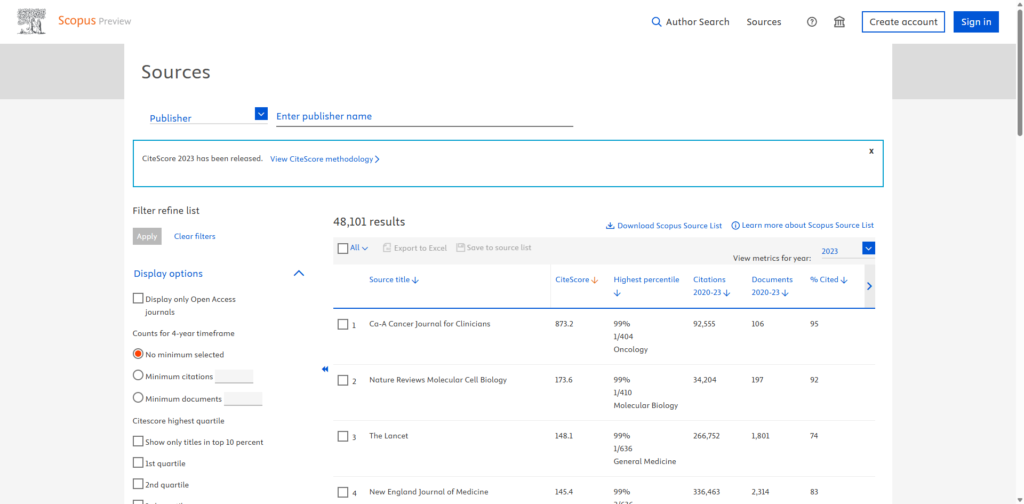
Step 2: Select “ISSN” from the dropdown menu for the most accurate results, as titles can sometimes be similar between legitimate and predatory journals.
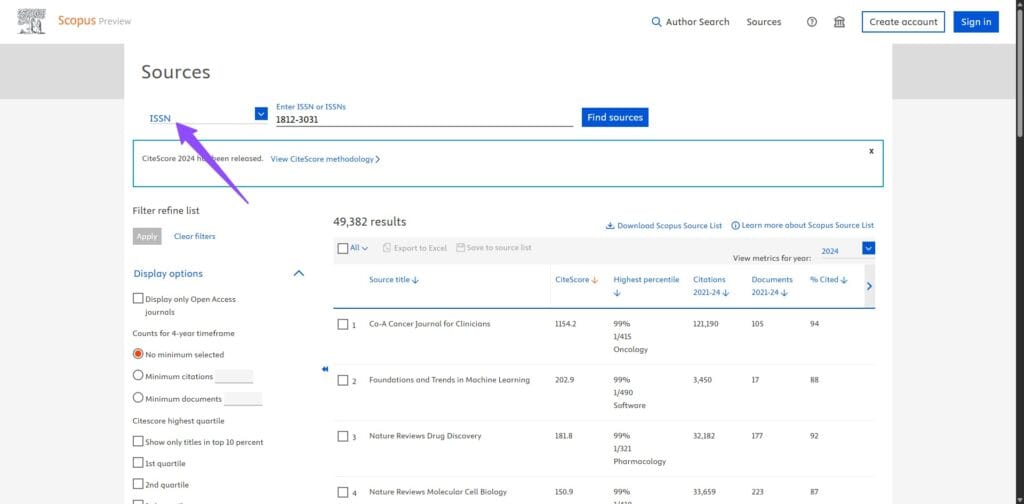
Step 3: Enter the 8-digit ISSN (for example, 1234-5678) into the search bar.
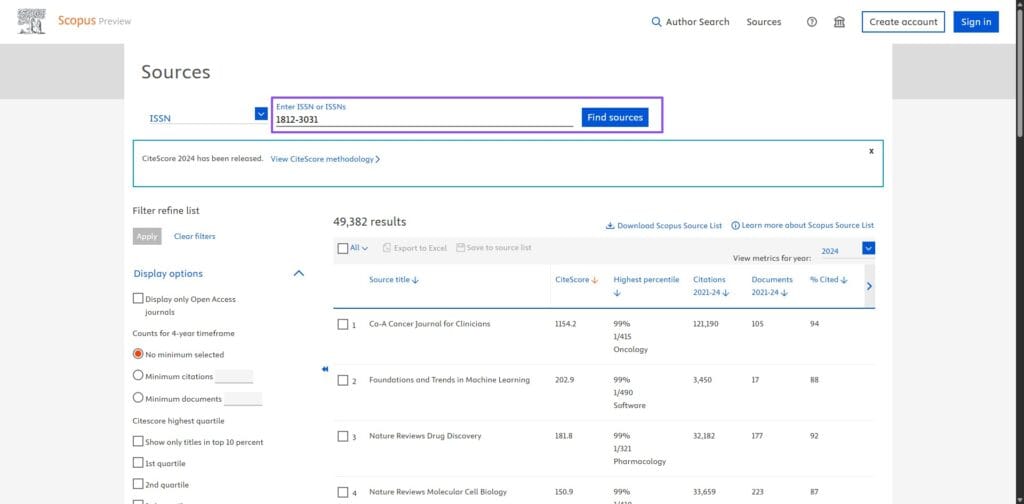
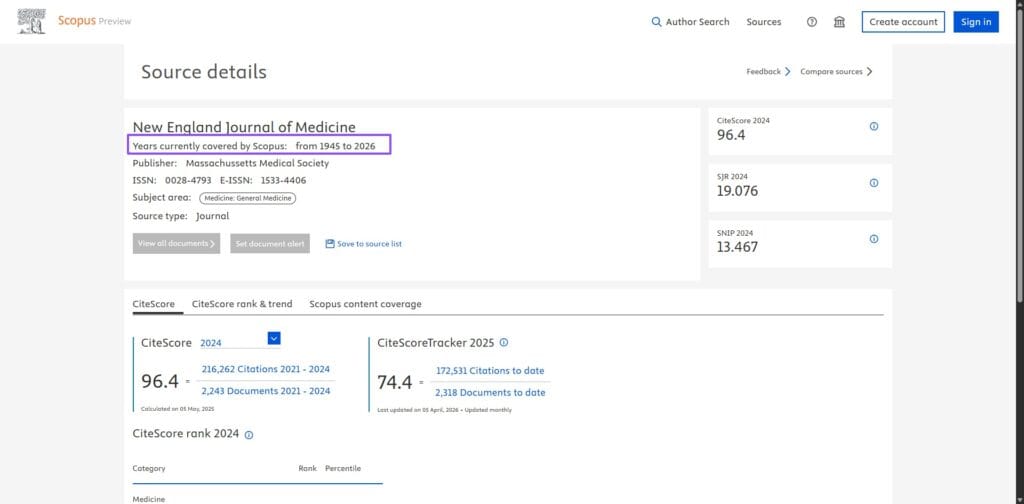
Step 4: Review the results. If the journal is listed, click on it to see the full “Scopus coverage years.” It must state “to Present” or specifically include the current year to be considered active.
2. Download the Scopus Source List (Excel)
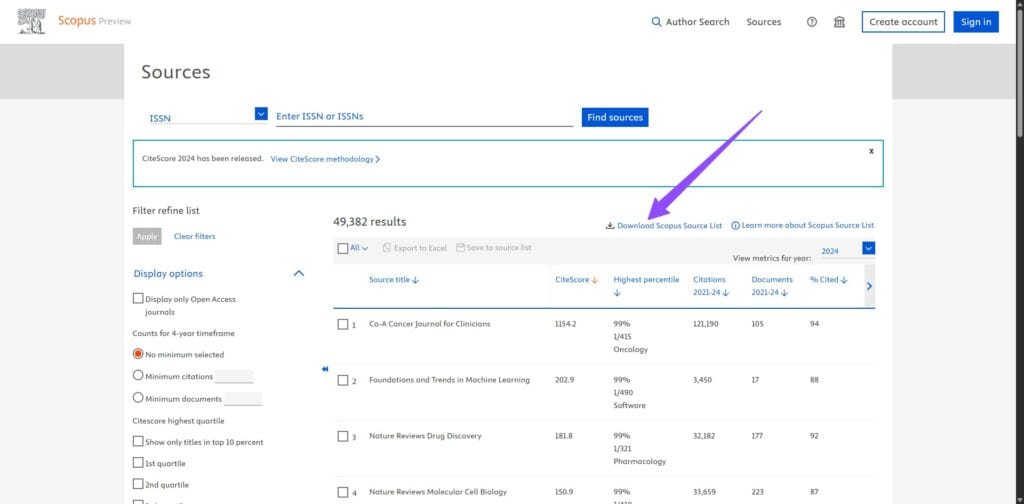
For researchers who need to verify multiple journals or perform an offline check, Elsevier provides a downloadable Excel file. This master record is used by universities and ranking bodies worldwide. The file is typically updated monthly, with the latest major update released in early 2026. This spreadsheet includes a specific tab for **Discontinued Titles**, which is vital for identifying journals that have lost their indexing status due to ethical or quality violations.
How to Check if a Conference is Scopus Indexed
While most researchers focus on journals, it is also important to understand how to check if a journal is indexed in Scopus when dealing with conference proceedings. In 2026, many high-impact fields—particularly Computer Science and Engineering—prioritize conference publications, but these are also subject to the same rigorous Scopus journal check requirements to ensure academic validity.
To verify if a conference is currently covered, you should follow these specific steps on the Scopus Sources page:
- Filter by Source Type: On the official Scopus Sources page, use the “Source Type” dropdown menu and select “Conference Proceedings.”
- Search by Acronym: Many conferences are better known by their acronyms (for example, IEEE or ACM). You should search for both the full title and the acronym to ensure you find the correct record.
- Verify the Year: Conference indexing can be inconsistent. You must confirm that the specific proceedings for the 2026 event are listed in the “Content Coverage” section.
- Check the Publisher: Ensure the proceedings are published by a recognised organisation such as Springer (Lecture Notes in Computer Science) or IEEE, as these are more likely to maintain stable indexing.
The Scopus Discontinued List: Identifying Delisted Journals
Learning how to check if a journal is indexed in Scopus is the first step, but performing a regular Scopus journal check against the discontinued list is equally important. Indexing is not a permanent status, and journals that fail to maintain rigorous editorial standards are removed from the database during annual re-evaluations.
In 2026, the Scopus Content Selection and Advisory Board (CSAB) monitors several factors to determine if a publication should be delisted. You should remain vigilant for the following red flags:
- Publication Concerns: Significant changes in the number of articles published or sudden shifts in the geographic diversity of authors.
- Citation Issues: Evidence of citation manipulation or an excessive number of self-citations within the journal.
- Radar Alerts: Scopus uses an algorithm to identify “outlier” journals that demonstrate suspicious growth patterns.
- Ethical Violations: Any proof of compromised peer-review processes or predatory practices.
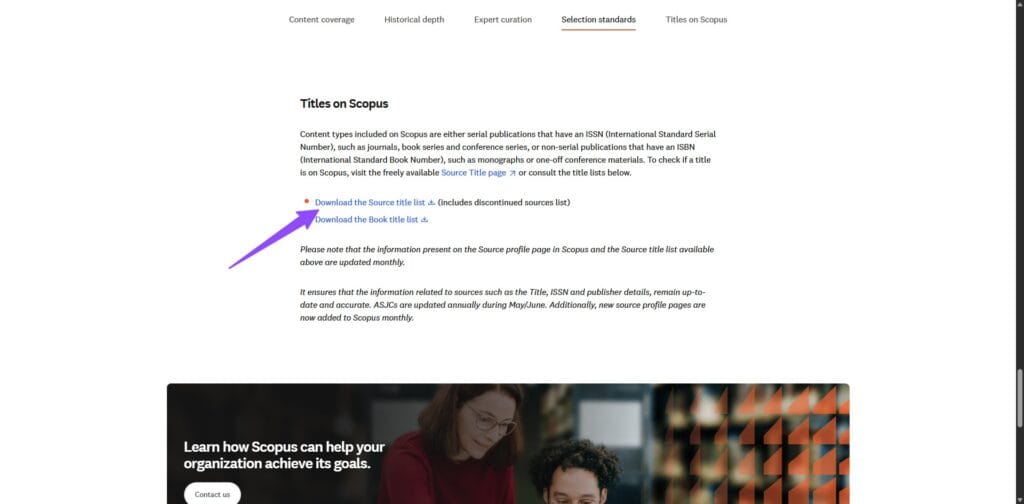
To ensure your work remains protected, you should always download the latest 2026 Scopus Discontinued Sources List. This official Excel document provides a definitive record of the final volume and issue indexed for every delisted journal. If you submit your manuscript to a publication that has been discontinued, your research will not appear in the Scopus database, which could negatively impact your academic standing and institutional requirements.
How to Identify Hijacked and Predatory Journals
While performing a scopus journal check, you may encounter publications that claim to be indexed even when they are not. In the academic community, these are officially known as hijacked journals or cloned journals. These entities create fraudulent websites that mimic the appearance of legitimate, indexed publications to deceive researchers into paying high submission fees.
To ensure you do not fall victim to these scams, you should look for the following warning signs during your search:
- Inconsistent Web Addresses: Hijacked journals often use URLs that are slightly different from the official site listed in the Scopus database.
- False Metrics: Many predatory sites display a “Global Impact Factor” or “Index Copernicus” value instead of the official Scopus CiteScore.
- Unrealistic Turnaround Times: If a journal promises “guaranteed publication” within a few days, it is likely that it is not performing a legitimate peer-review process.
- Incorrect ISSN Usage: Some fake journals will use a stolen ISSN from a discontinued or unrelated publication to bypass initial verification filters.
The only foolproof way to protect yourself is to follow the official process for how to check if a journal is indexed in Scopus. Always navigate to the journal website directly from the link provided on the Scopus Sources page. If the web address on the official portal does not match the one you are visiting, you should treat the publication as a high-risk entity and avoid submitting your research.
Conclusion
Verifying a journal in Scopus is an essential part of the modern research workflow. By utilising the official Scopus Sources page and cross-referencing with the 2026 Source List, you can ensure that your research is published in a venue that meets international standards for quality and integrity. Protecting your work starts with choosing a verified platform, as this ensures your citations are tracked accurately and your academic contributions are recognised by the global scientific community.
Need to access research papers for your next study?
Once you have identified the right journal, you may need to access existing literature. Read our updated guide on how to download research papers for free to streamline your literature review process.
Frequently Asked Questions
How often is the Scopus Source List updated in 2026?
The Scopus Source List is updated on a regular basis, typically every month. It is important to check the most recent version from the 2026 calendar year to ensure the journal status has not changed.
Can I check Scopus indexing for free?
Yes, you can search for journals on the Scopus Sources page without a paid subscription. This allows anyone to verify the indexing status of a journal officially.
What should I do if a journal is listed as “Discontinued” in Scopus?
If a journal is discontinued, Scopus will no longer index new articles published in it. You should avoid submitting your work to these journals if you require Scopus-indexed publications.
Why is a journal on SCImago but not appearing in the Scopus search?
This usually happens if a journal was recently discontinued. SCImago uses historical data, while the Scopus Sources page reflects the most current indexing status.
Does Scopus index conference proceedings?
Yes, Scopus indexes many reputable conference proceedings. You can verify these by selecting “Conference Proceedings” under the “Source Type” filter on the Scopus Sources page.