Finding ways to download research paper free is a common challenge for students, academics, and professionals who need high-quality data without the burden of expensive subscription fees. Fortunately, the academic landscape in 2026 has shifted heavily towards open access, making it easier than ever to locate scholarly content legally. By utilising global repositories and author-shared versions, you can access the latest scientific and social breakthroughs at no cost.
How to Download Research Paper Free in Google Scholar
There are many research papers on the internet that are not available for free download because they are behind paywalls or require subscriptions. However, Google Scholar often provides access to free versions of these papers uploaded by authors, universities, or research repositories. By following specific steps, it is possible to locate and download these papers at no cost.
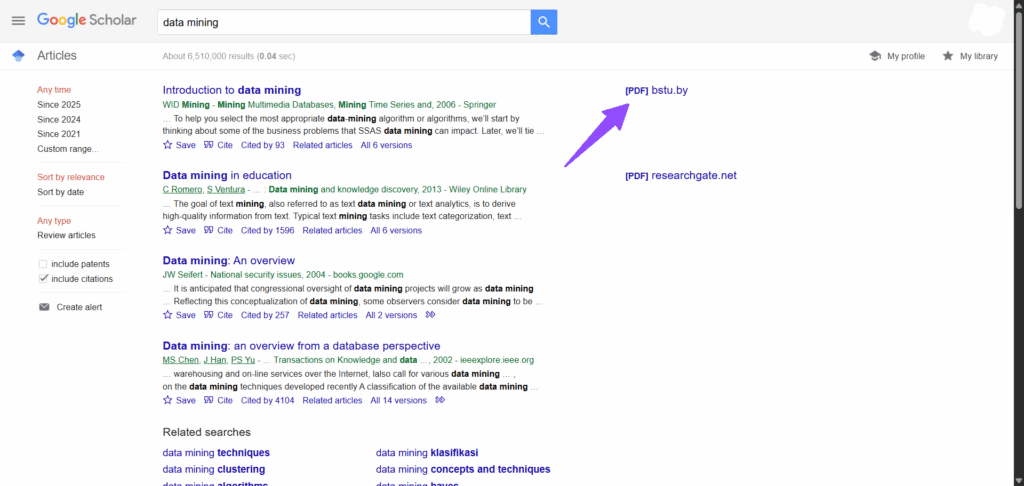
- Open https://scholar.google.com.
- Type the full title of the research paper in quotation marks or enter relevant keywords.
- Press Enter to display the search results.
- Look at the right-hand side of each result for a link marked
[PDF],[HTML], or similar. - Click the available
[PDF]or[HTML]link to open the paper. - Once the paper opens, use the browser’s download option or keyboard shortcut to save it.
- If there is no link on the right-hand side, click “All versions” under the paper title.
- Review the listed versions to locate one with a downloadable file.
- If still unavailable, click the main title of the paper to open the publisher’s page.
- On the publisher’s page, look for a download or full-text option and open it.
- After accessing the file, save it directly from the browser.
How to Download Research Paper Free in ResearchGate
There are research papers on ResearchGate that are not immediately available for download because some authors choose to restrict access to their full texts. However, ResearchGate allows users to request a copy directly from the author or download it instantly if it has been shared publicly. By following the proper steps, you can access and download these research papers for free.
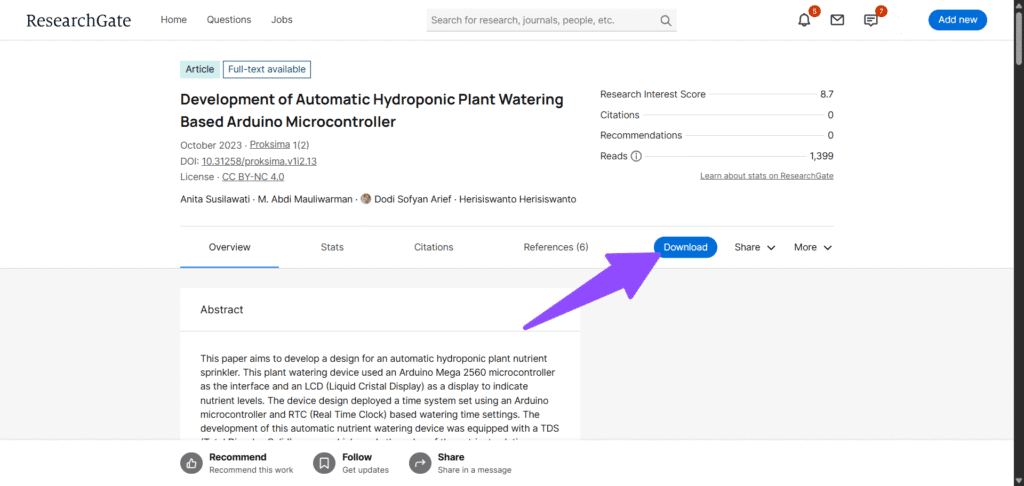
- Open https://www.researchgate.net.
- Type the title of the research paper, keywords, or author name in the search bar.
- Press Enter to display the search results.
- Browse through the list and select the paper that matches your search.
- Check if there is a “Download full-text PDF” button on the paper’s page.
- If the button is visible, click it to open or download the paper.
- If the paper is not directly downloadable, click the “Request full-text” button.
- A message box will appear — write a short request asking the author to share the paper.
- Click “Send request” to submit your message to the author.
- Wait for the author’s response; once approved, you will receive a notification and a link to download the paper.
- After access is granted, open the file and save it directly from your browser.
How to Download Research Paper Free in CORE
Many research papers are hosted in CORE, an open-access repository that gathers free research outputs from universities and research institutions worldwide. Some papers may not be immediately downloadable from other sources, but CORE provides access to freely available versions shared by authors. By following the steps below, you can search for and download research papers for free.
- Open https://core.ac.uk.
- Type the full title of the research paper, keywords, or author name in the search bar.
- Press Enter to view the list of search results.
- Browse through the results to find the paper that matches your search.
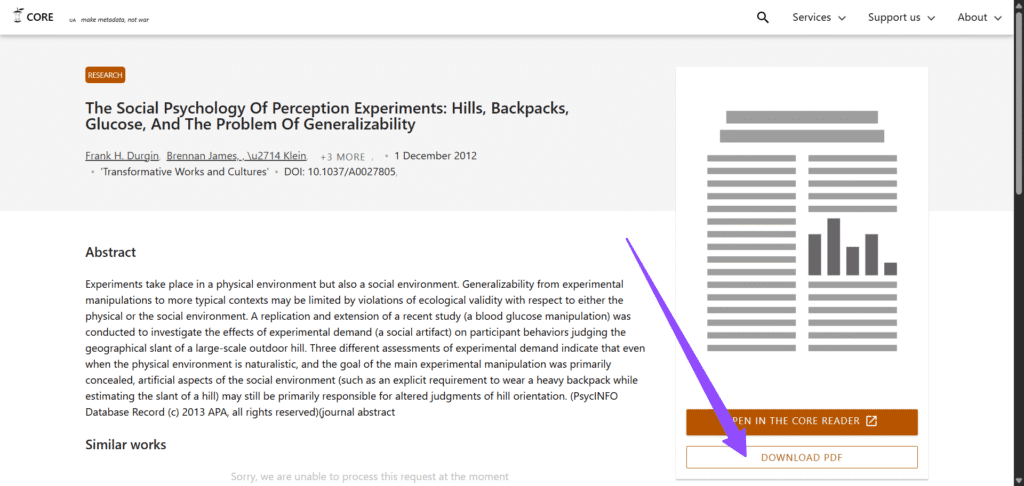
- Click on the paper title to open its details page.
- Check if there is a “Download PDF” button on the page.
- If the button is available, click it to open the full paper.
- Once the paper opens, use your browser’s download option or shortcut to save it.
- If the “Download PDF” button redirects to another repository or university page, follow the link provided.
- On the external page, locate and select the download option to get the full-text file.
- After the file is downloaded, open and save it for offline use.
How to Download Research Paper Free in DOAJ
The Directory of Open Access Journals (DOAJ) provides free access to thousands of peer-reviewed articles, allowing users to download full-text papers legally. By following these steps, you can locate and download research papers from DOAJ.
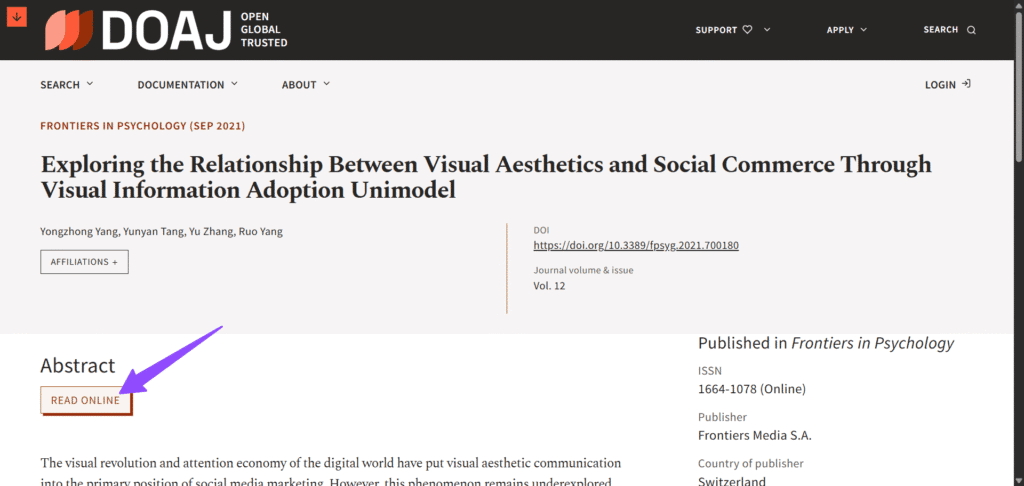
- Open https://www.doaj.org.
- Enter the title of the research paper, relevant keywords, or author name in the search bar.
- Press Enter to view the search results.
- Browse through the list to identify the paper that matches your search.
- Click on the paper title to open its detailed page.
- Look for a “Read Online” button on the page.
- Click the button to open the paper online.
- If the PDF link redirects to an external page, follow the link to access the full-text version.
- On the external page, locate and click the download option to save the paper.
- After downloading, open the file and save it locally for offline reading.
How to Download Research Paper Free in arXiv
Some research papers are not freely available through traditional journals due to paywalls or subscription requirements. arXiv is a repository that provides free access to preprints in fields like physics, mathematics, computer science, and more. By following these steps, you can search for and download research papers from arXiv.
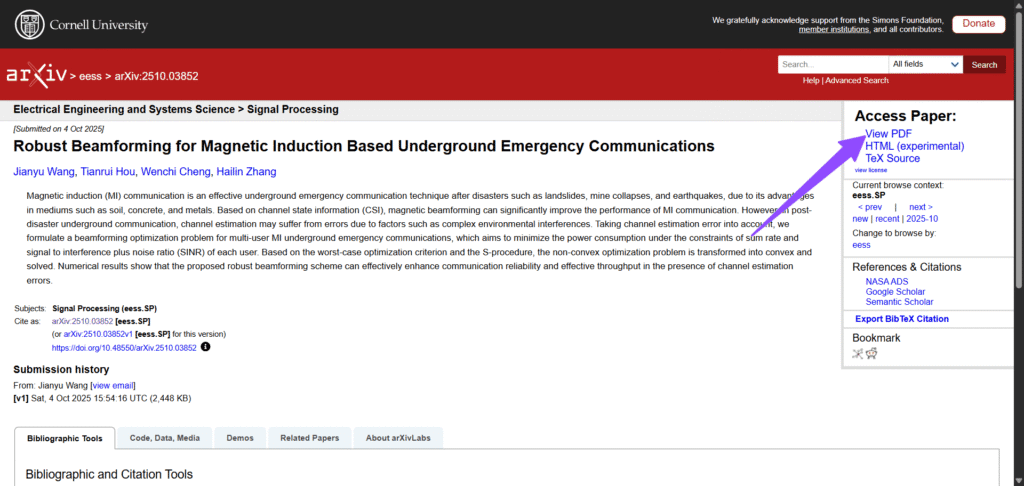
- Open https://arxiv.org.
- Type the title of the research paper, relevant keywords, or author name in the search bar.
- Press Enter to view the search results.
- Browse through the list to identify the paper that matches your search.
- Click on the paper title to open its abstract page.
- On the abstract page, look for the “PDF” link on the right-hand side.
- Click the “PDF” link to open the full paper.
- Once the PDF opens, use your browser’s download option or keyboard shortcut to save it.
- If necessary, rename and organise the file for easy reference.
- Repeat the process for any additional papers you wish to download.
How to Download Research Paper Free in Semantic Scholar
Semantic Scholar provides access to a large database of research papers, including freely available PDFs hosted by authors, institutions, or open-access repositories. By following these steps, you can locate and download research papers from Semantic Scholar.
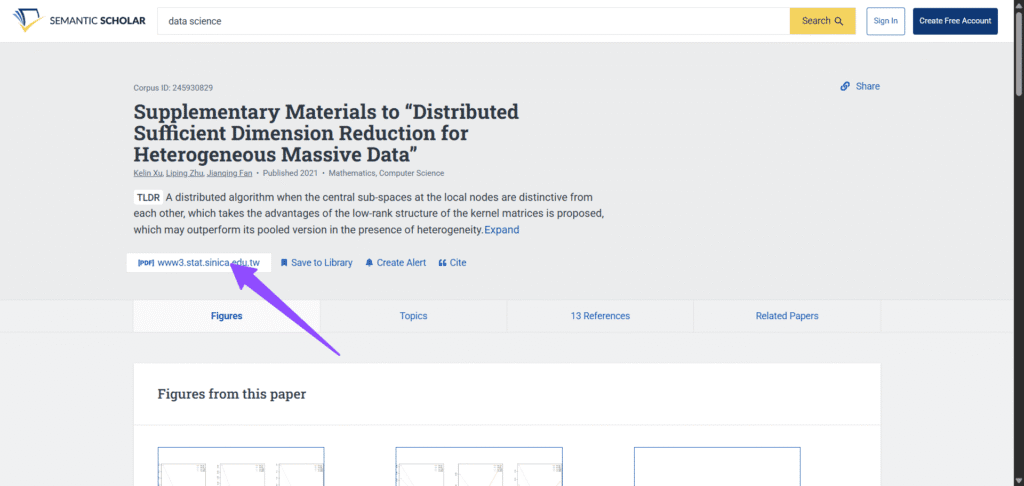
- Open https://www.semanticscholar.org.
- Type the title of the research paper, keywords, or author name in the search bar.
- Press Enter to display the search results.
- Browse through the results to identify the paper that matches your search.
- Click on the paper title to open its detailed page.
- Look for a “PDF” or “Full Text” link, usually on the right-hand side.
- Click the link to open the full paper.
- Once the PDF opens, use your browser’s download option or keyboard shortcut to save it.
- If the link redirects to an external site, follow the link to access the full-text file.
- After downloading, open and save the paper locally for offline access.
- Repeat the process for any additional papers needed.
How to Download Research Paper Free in Open Access Journals Through Scopus
Many research papers indexed in Scopus are behind paywalls, making them inaccessible without subscriptions. However, Scopus also indexes open-access journals, which allow full-text downloads legally. By following these steps, you can locate and download freely available research papers through Scopus.
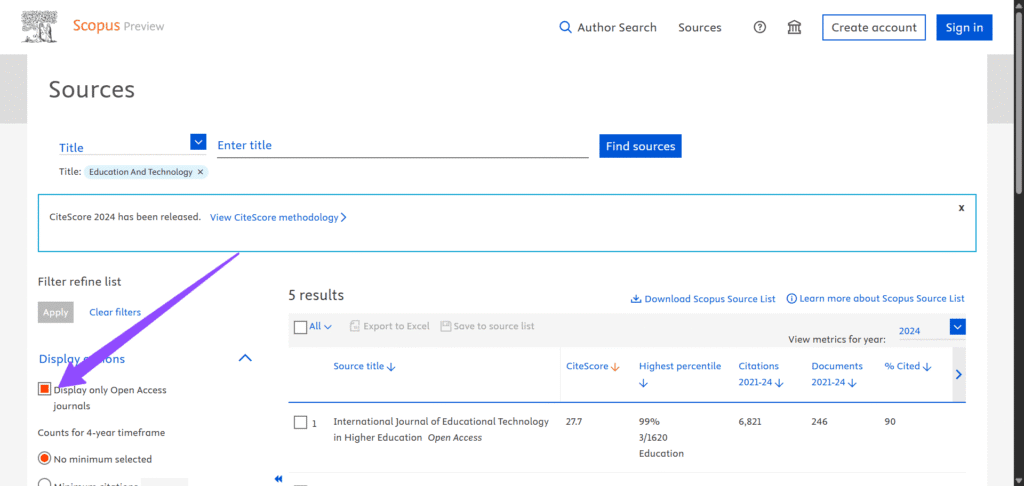
- Open https://www.scopus.com.
- Sign in if required through your institution or personal account.
- Go to the Sources search tab to search for journals, not individual papers.
- Enter the journal title or keywords related to the journal.
- Press Enter to view the journal search results.
- On the search results page, locate “Display Options” and check the box for “Display only Open Access journals”.
- Browse through the filtered results to find the journal you want.
- Click on the journal title to open its Scopus record.
- From the journal record, follow the link to the journal’s website.
- On the journal website, use the search function to find the specific paper you need.
- Look for a “Full Text” or “PDF” download option and click it to open the paper.
- Once the PDF opens, use your browser’s download option or keyboard shortcut to save it locally.
- Repeat the process for additional papers from the same or other open-access journals.
How to Download Research Paper Free Using Google Search with filetype:pdf
Many research papers are behind paywalls, but sometimes authors or institutions upload free PDF copies online. You can use Google search operators to locate these PDFs directly.
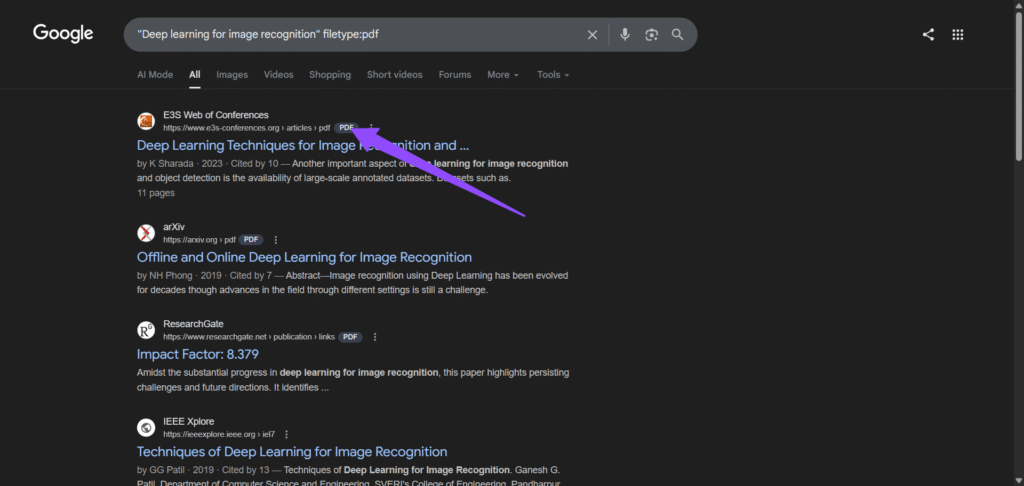
- Open https://www.google.com.
- In the search bar, type the title of the research paper in quotation marks.
- Add
filetype:pdfat the end of the search query.- Example:
"Deep learning for image recognition" filetype:pdf
- Example:
- Press Enter to view the search results.
- Browse through the results for links that point directly to PDF files, often hosted on university, research group, or repository websites.
- Click the link to open the PDF in your browser.
- Use your browser’s download option or press
Ctrl + S(Windows) orCmd + S(Mac) to save the paper locally. - Repeat the process for additional papers by changing the title or keywords in the search query.
filetype:pdf command with the author’s name or a unique sentence from the abstract. This helps bypass commercial results and takes you directly to free copies hosted on the author’s personal university webpage.How to Download Research Paper Free in SSRN
Some research papers in SSRN are restricted in journals, but SSRN provides free access to working papers and preprints shared by authors. By following these steps, you can locate and download research papers from SSRN.
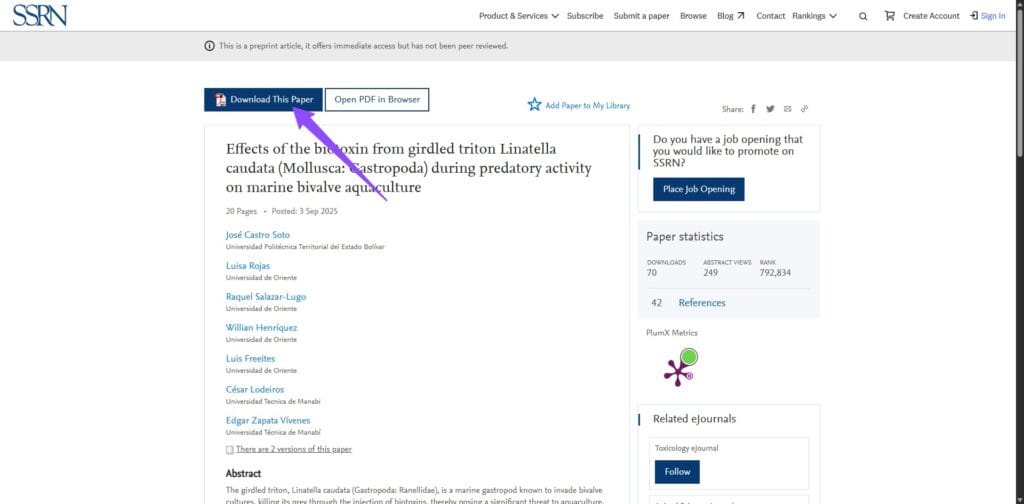
- Open https://www.ssrn.com.
- Use the search bar to enter the title of the research paper, keywords, or author name.
- Press Enter to view the search results.
- Browse through the results to identify the paper that matches your search.
- Click on the paper title to open its abstract page.
- Look for the “Download This Paper” button, usually located on the right-hand side or near the abstract.
- Click the button to open the PDF file.
- Once the PDF opens, use your browser’s download option or keyboard shortcut to save it locally.
- Repeat the process for any additional papers you wish to download.
How to Download Research Paper Free in PubMed Central (PMC)
Some research papers in the biomedical and life sciences are behind paywalls, but PubMed Central (PMC) provides free access to full-text articles. By following these steps, you can locate and download research papers from PMC.
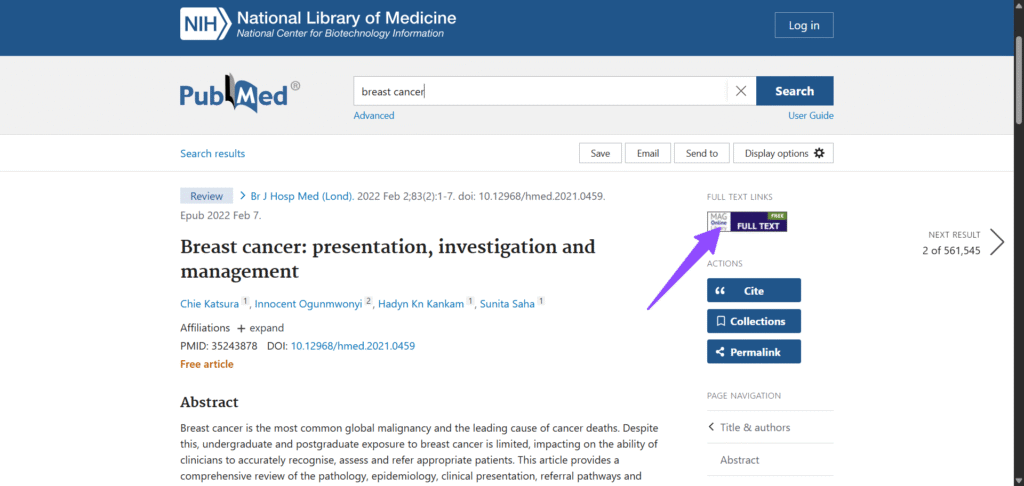
- Open https://pubmed.ncbi.nlm.nih.gov/.
- Enter the title of the research paper, relevant keywords, or author name in the search bar.
- Press Enter to view the search results.
- Browse through the results to identify the paper that matches your search.
- Click on the paper title to open its full record page.
- Look for a “Full Text” or “PDF” link, usually located near the top of the page.
- Click the link to open the full paper.
- Once the PDF opens, use your browser’s download option or keyboard shortcut to save it locally.
- Repeat the process for any additional papers you wish to download.
Final Thoughts on How to Download Research Papers for Free
Downloading academic research papers does not have to be expensive or complicated. By using the 10 methods outlined in this guide, you can legally download research paper free from trusted platforms like Google Scholar, ResearchGate, CORE, DOAJ, arXiv, Semantic Scholar, Scopus, and others. These resources make it easier for students, researchers, and professionals to stay informed, complete projects, and advance knowledge without subscription barriers.
Need more technical resources?
For more ways to expand your research resources, do not forget to check out our post on How to Access IEEE Papers for Free and discover additional methods to download high-quality technical papers legally.
Frequently Asked Questions about Downloading Research Papers for Free
Is it legal to download research paper free?
Yes, it is entirely legal to download research paper free as long as you use legitimate open-access repositories, university archives, or platforms where authors have shared their work voluntarily. Avoiding pirated databases ensures that you maintain academic integrity while accessing the information you need.
What are the best sites to download research paper free in 2026?
In 2026, the most reliable sites include Google Scholar, CORE, arXiv, and the Directory of Open Access Journals (DOAJ). These platforms aggregate millions of peer-reviewed articles that are permanently available to the public at no cost.
How can I access research papers that are behind a paywall?
If a paper is behind a paywall, you should check for alternative versions on Google Scholar by clicking the “All versions” link. You can also install the Unpaywall browser extension, which automatically searches the web for a legal, free copy of the article you are viewing.
Do I need an account to download papers from these platforms?
Most major repositories such as arXiv, PMC, and CORE allow you to download research paper free without any registration. However, some academic social networks like ResearchGate may require you to create a free account to download files or to message an author directly for a copy.
Can I download research papers for free through my local library?
Yes. Many public and university libraries offer “walk-in” access to their digital collections. Additionally, schemes such as Access to Research in the UK allow members of the public to view and sometimes save millions of academic articles for free from library computer terminals.