Learning how to write discussion in research paper using AI can transform a daunting task into a streamlined, logical process. With the rise of advanced language models, researchers now have a powerful ally that helps synthesise complex data and identify significant trends. Instead of struggling to find the right words to interpret your results, you can use AI to generate a strong foundation. This allows you to focus your expertise on critical analysis and the broader implications of your study. This approach ensures your discussion section is well-structured and aligns with the highest scholarly standards.
Steps on How to Write Discussion in Research Paper Using AI
Writing the discussion section of a research paper is often one of the most challenging aspects of a manuscript. However, AI tools like ChatGPT can make the process faster and more efficient.
Follow these five simple steps to generate a well-structured discussion effortlessly. These steps are designed to keep your writing focused and analytically rigorous.
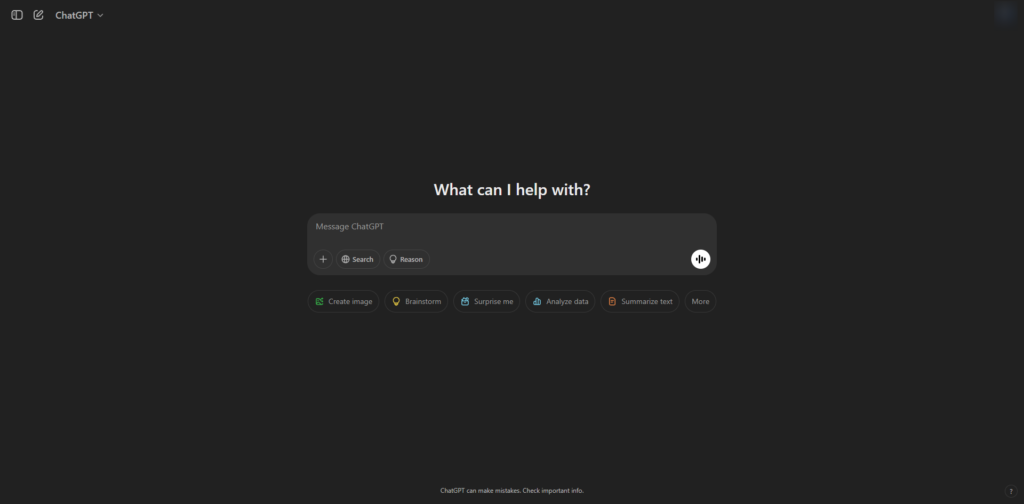
Step 1: Open ChatGPT
Start a new conversation in ChatGPT. It is important to use a fresh chat to ensure the AI focuses solely on your current results without interference from previous tasks.
Step 2: Copy and Paste the Prompt
To get the best results when learning how to write discussion in research paper using AI, you must use a highly structured prompt. This prevents the AI from being too generic and forces it to focus on analytical interpretation rather than a simple summary of numbers.
You are an academic researcher with expertise in [insert field, e.g., environmental science, economics, psychology].
The objective of this study is [insert study objective].
Your task is to write a discussion section for the results table titled [insert table title] that I will paste after this.
In the first paragraph, discuss what this table is about. Start with a phrase such as “Table 1 presents the…” and then provide a summary of key patterns, noteworthy insights, or values. Do not simply repeat numerical values from the table. Instead, highlight unexpected findings or significant observations in a clear and coherent manner, such as the highest, lowest, or average values.
In the second paragraph, interpret the findings both verbally and analytically. This involves: (1) comparing the results with previous research—either supporting or contradicting past studies, (2) offering possible explanations for the observed trends, and (3) discussing the broader implications of the findings for theory, practice, or policy. Ensure the writing is academic, well-structured, and insightful, maintaining clarity and coherence throughout.
Step 3: Edit the Prompt
Before hitting enter, update the field of study, research objectives, and table title to match your specific research. This ensures the AI generates content that is tailored to your unique findings.
Step 4: Paste Your Table
Insert your results table into the conversation. Ensure it is well-organised. If your table is complex, you may want to simplify it into a clear text format or a clean CSV-style structure so the AI can analyse the relationships between variables accurately.
Step 5: Review and Refine
Read through the AI-generated text carefully. You must make any necessary edits to ensure it aligns perfectly with your research findings. AI is an assistant, but you are the final authority on your data.
Why Writing the Discussion Section Using AI Is Transformative
Writing the discussion section of a research paper requires a deep level of analysis and the seamless synthesis of complex findings. AI-driven tools support researchers in crafting a well-structured, clear, and insightful section while maintaining strict academic integrity. By understanding how to write discussion in research paper using AI, you can navigate the most demanding part of the manuscript process with greater confidence.
Leveraging AI for research discussions allows you to move past the initial drafting phase quickly. This ensures that your intellectual energy is spent on high-level interpretation rather than the mechanics of writing. Below are the primary benefits of incorporating these tools into your workflow.
Saves Substantial Time and Effort
Crafting a compelling discussion is traditionally the most time-intensive part of the writing process. When you focus on how to write discussion in research paper using AI, you can automate the heavy lifting of initial drafting.
- Rapid Data Synthesis: AI writing assistants can analyse your results tables and generate a summary of key trends in seconds.
- Instant Outlining: You can use AI for research paper discussions to create a logical framework based on your study objectives.
- Efficient Literature Comparison: These tools help you quickly find and summarise relevant studies to compare against your own data.
- Productivity Boost: By generating structured drafts, you reduce the weeks spent on revisions and formatting.
Enhances Clarity and Readability
Academic writing often involves dense language and intricate jargon that can confuse peer reviewers. Using AI for academic discussion writing helps you maintain a clear and professional tone throughout your manuscript.
- Precision in Phrasing: AI suggests academic collocations and professional terminology that enhance the authority of your work.
- Removing Redundancy: These tools identify and eliminate repetitive sentences, making your arguments more punchy and direct.
- Sentence Structure Optimisation: AI helps break down overly complex sentences to ensure your findings are accessible to a global audience.
- Tone Adjustment: You can ensure the writing remains formal, avoiding the casual language that often creeps into first drafts.
Improves Logical Flow and Structure
A well-structured discussion is crucial for articulating your findings in a way that makes sense to the reader. Understanding how to develop a research discussion section using AI ensures that your arguments progress logically from one point to the next.
- Seamless Transitions: AI tools suggest effective signposting phrases that link your results to your broader conclusions.
- Identifying Reasoning Gaps: Advanced models can highlight areas where your interpretation might lack sufficient evidence or logical connection.
- Paragraph Organisation: AI helps group related findings together, preventing the discussion from feeling disjointed or scattered.
- Structural Integrity: By following a programmed framework, you ensure that every required element of a discussion—from gaps to implications—is included.
Aids in Deep Analytical Interpretation
One of the most valuable aspects of crafting research discussions with AI is the ability to see your data from new perspectives. AI excels at spotting correlations that might not be immediately obvious.
- Pattern Recognition: AI can identify subtle links between different variables in your results table.
- Alternative Explanations: You can ask the AI to provide different perspectives on why a specific result occurred, enriching your analysis.
- Synthesising Implications: These tools help you articulate the broader impact of your study on policy, theory, or future practice.
Common Mistakes to Avoid When Writing a Discussion
While AI can assist with the writing process, it is essential to avoid certain pitfalls that can undermine the impact of your research:
- Restating Results Without Interpretation: Do not simply repeat the data. Focus on explaining what the numbers mean and why they matter.
- Lack of Comparisons: Failing to connect your findings to previous research weakens your argument. Discuss how your results align with or challenge existing studies.
- Ignoring Unexpected Findings: Surprising results often lead to significant insights. Address them thoughtfully rather than leaving them out.
- Overgeneralising: Ensure your conclusions are directly supported by the evidence. Avoid making broad claims that are not substantiated by your data.
How to Use AI Ethically in Research Writing
Responsibility is key when learning how to write discussion in research paper using AI. To maintain academic integrity, you should follow these guidelines:
- Avoid Plagiarism: Never copy AI-generated text directly without citation or significant editing. Verify that any sources or ideas mentioned are properly attributed.
- Ensure Originality: Your original analysis should be the foundation. Use AI to help present your ideas clearly, but the core insights must be yours.
- Verify Accuracy: AI can occasionally produce misleading information. Always cross-check AI-generated insights against credible academic sources before final submission.
Conclusion
AI is a powerful tool that helps researchers write high-quality discussion sections efficiently. By following structured steps and ethical guidelines, you can leverage AI to enhance the clarity, structure, and depth of your academic writing.
However, you must always remain the lead author by reviewing and refining every sentence to ensure accuracy and originality. With AI as your writing assistant, the challenge of interpreting complex data becomes a manageable and even rewarding task.
Are you looking for more ways to enhance your research?
If you are not getting the results you want from ChatGPT, there are plenty of other specialised platforms available. Explore our guide on Free AI Tools for Research Writing to find the best assistants for grammar, citation management, and deep literature analysis.
Frequently Asked Questions
Is writing the discussion section using AI considered plagiarism?
It is not considered plagiarism if you use the tool as a writing assistant to structure your thoughts and refine your language. However, you must ensure that the final analysis reflects your own intellectual contribution and that all ideas are properly attributed to their original sources. You should never copy AI-generated text verbatim without significant editing and verification.
Which AI tool is best for interpreting research results in 2026?
ChatGPT remains a powerful tool for structuring logical arguments and interpreting data from tables. For researchers who require real-time citation verification during the drafting process, Perplexity AI is highly recommended as it connects every claim to a verified academic source.
How can I ensure the AI does not hallucinate information in my discussion?
You must always cross-check the AI-generated output against your raw data and the existing literature in your field. While AI is excellent at identifying patterns, it is your responsibility to verify that the logic is sound and that any cited studies actually exist and support the claims being made.
Can AI help me identify the broader implications of my study?
Yes. By providing the AI with the specific objectives and results of your research, you can prompt it to suggest potential impacts on policy, theory, or future practice. This helps you move beyond the data and explain the “so what” of your research to your audience.
Do I need to disclose the use of AI in my final manuscript?
Many academic journals in 2026 require a formal disclosure if AI was used to assist in the writing or data analysis process. You should always check the specific author guidelines of your target journal to ensure you are complying with their transparency requirements.