I have spent many hours searching for data, only to face the deep frustration of hitting a paywall just as I find the perfect study for my project. It’s a common hurdle, but I have found that learning how to download research papers from Google Scholar for free is often just a matter of knowing where the hidden links are. In my experience, a Google Scholar research paper download is usually possible if you use the right legal channels and repositories.
This guide provides the legal, free ways I use to secure a Google Scholar free full PDF without the hassle of a subscription. My goal is to show you exactly how to download articles for free from Google Scholar so you can move from a “Purchase Access” screen to a saved Google Scholar research paper PDF in just a few seconds. I will also explain how to download PDFs from Google Scholar using library links and open-access tools, ensuring you always have the Google Scholar PDF you need for your analysis.
How to Download Research Paper from Google Scholar for Free
I have spent years navigating the digital aisles of academic libraries, and I know that the search for knowledge often stops at a payment window. Finding a way to bypass these obstacles legally is an essential skill for any modern academic. I have refined a specific set of techniques that allow for a seamless Google Scholar research paper download without violating any copyright rules. By using the following methods, I can usually secure a Google Scholar PDF for almost any study I encounter.
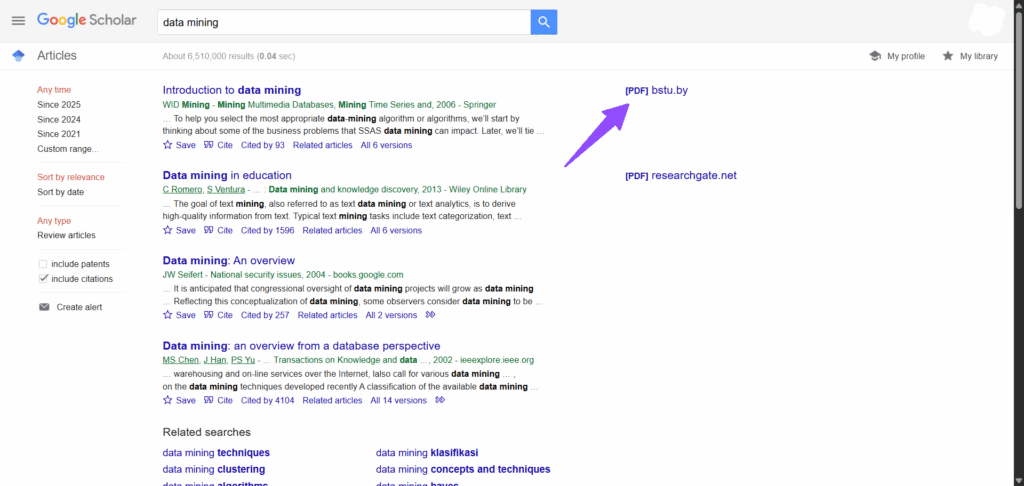
The first thing I do when I land on a results page is look to the far right of the screen. This is often the quickest way to initiate a Google Scholar free PDF download without having to navigate through multiple websites.
- How it works: Google Scholar automatically crawls institutional repositories to find copies of papers that the authors have legally shared with the public.
- My Experience: I have found that this is the most reliable way to download a PDF from Google Scholar instantly, especially for papers published within the last decade.
- What I love about it: It requires zero extra tools or logins, making it the most efficient way to start a Google Scholar article download.
- Enter your search query into the search bar.
- Scan the right-hand column of the results page for a label that says “[PDF]” or “[HTML]”.
- Click that specific link to open the document directly in your browser.
Utilise the ‘All Versions’ Feature
If the main link directs me to a paywalled publisher site, I do not give up. I have discovered that checking the alternative versions is a hidden gem for anyone trying to learn how to download papers from Google Scholar. It often reveals alternative hosts that the main algorithm might have overlooked.
- How it works: This feature displays every place the web crawler has found that specific Google Scholar research paper PDF, including preprints and author-archived copies.
- My Experience: It’s common to find a Google Scholar free full PDF on a professor’s personal page or a university server that does not appear on the primary search result.
- How it saves time: Instead of searching multiple databases manually, I can see every available copy of the paper in one consolidated list.
- Locate the “All versions” link found directly beneath the search result summary.
- Click the link to see a list of every source where Google has indexed that specific paper.
- Look for versions hosted on university (.edu) or repository sites to find a Google Scholar free full PDF.
Configure Google Scholar Library Links
One of the most powerful tools in my arsenal is the “Library Links” setting. I use this to connect my search results directly to my university’s paid subscriptions. This is a game-changer if you are a student or faculty member wondering how to download articles for free from Google Scholar while you are working from home.
- How it works: Once configured, a “Full-Text @ [Your Library]” link will appear next to results, allowing you to download a PDF from Google Scholar via your institution’s proxy.
- My Experience: I find this method superior to logging into a library portal separately; it is much faster and allows me to see everything my library owns directly in my search results.
- Why it is essential: It bridges the gap between public search results and private institutional access, making it easier to download a PDF from Google Scholar legally.
Setting up your institutional access
- Click the three horizontal lines (menu) in the top left corner of the page and select “Settings”.
- Select “Library links” from the sidebar menu.
- Search for your university or institution, tick the box next to its name, and click “Save”.
Install Open-Access Browser Extensions
When the standard search fails, I let automation do the work. I have integrated several browser extensions into my workflow that specifically help me with how to download PDFs from Google Scholar. Tools like Unpaywall work in the background to find legal, open-access versions of the paper I am viewing.
- How it works: These tools search a vast database of open-access repositories to find a Google Scholar free full PDF that matches the DOI of the paper you are looking at.
- My Experience: I have found that these extensions often catch a Google Scholar free PDF download that Google itself has missed, particularly for older or very niche scientific papers.
- What I find most useful: It’s a completely passive system; I do not have to think about it until the icon lights up, telling me that a Google Scholar research paper PDF is ready for me.
Installing and using open-access extensions
- Visit the Chrome Web Store and search for the “Unpaywall” or “CORE Discovery” extension.
- Install the extension and ensure it is pinned to your browser toolbar.
- Visit any publisher page; if a free version exists, a green or blue padlock icon will appear on the right side of your screen.
Request the Full Text via ResearchGate
If all other automated methods fail, I go directly to the source. ResearchGate is a fantastic Google Scholar PDF alternative because it allows me to communicate with the authors of the study I am trying to read.
- How it works: Most researchers are thrilled to share their work with peers, and this is a perfectly legal way to facilitate a Google Scholar article download.
- My Experience: I have found that authors usually respond within a few days. It is a slower process, but it is often the only way to get a high-resolution Google Scholar research paper PDF for extremely recent studies.
- Why it is a great fallback: It turns a “dead end” search into a professional networking opportunity while helping you download a PDF from Google Scholar that is not otherwise available.
- Search for the title of the paper on the ResearchGate website.
- Once you find the publication page, look for the “Request full-text” button.
- Click the button to send a polite, automated request to the authors for a copy of their work.
Final Thoughts on How to Download Research Papers from Google Scholar for Free
I have learned over time that a paywall is rarely the end of the road for a dedicated researcher. While it is certainly a hurdle, knowing how to download research papers from Google Scholar for free is an empowering skill that ensures your work is never limited by your budget. Whether I am using institutional settings for a Google Scholar research paper download or relying on AI extensions to find a Google Scholar free full PDF, the tools available today make science more accessible than ever. It’s my hope that by mastering how to download articles for free from Google Scholar, you can spend less time navigating gatekeepers and more time focused on the insights that drive your own discovery.
Looking for more powerful research tools?
Once you have mastered your search on Google Scholar, you may want to explore other professional databases that offer deep citation tracking and analytics. Check out my guide on finding a Scopus alternative to broaden your academic horizons even further.
Frequently Asked Questions
Is it legal to perform a Google Scholar research paper download for free?
Yes, as long as you are accessing versions that have been made public by the authors, their institutions, or through open-access journals. I always recommend using the “All versions” link or institutional repositories to ensure you download a PDF from Google Scholar legally.
Why is a Google Scholar PDF link not showing up for every result?
This usually happens because the paper is restricted to a publisher’s paid platform. In these cases, I suggest checking for a Google Scholar research paper PDF in your library links or using a browser extension like Unpaywall to search for a legal, open copy elsewhere.
What is the most reliable way to perform a Google Scholar free PDF download?
In my experience, the most reliable method is configuring your “Library Links.” This allows you to perform a Google Scholar article download through your university’s existing subscriptions, which often covers papers that appear paywalled to the general public.
How to download papers from Google Scholar if I am not affiliated with a university?
If you do not have an institutional login, I find that searching for a Google Scholar free full PDF via the “All versions” tab or requesting the document directly from the author on ResearchGate are the most effective ways to download a PDF from Google Scholar.
Can I use these methods for a Google Scholar free PDF download on a mobile device?
Absolutely. You can still look for sidebar links or use the “All versions” feature on a mobile browser. However, for a more seamless Google Scholar research paper download, I find that using a desktop browser with research extensions installed provides a much higher success rate.