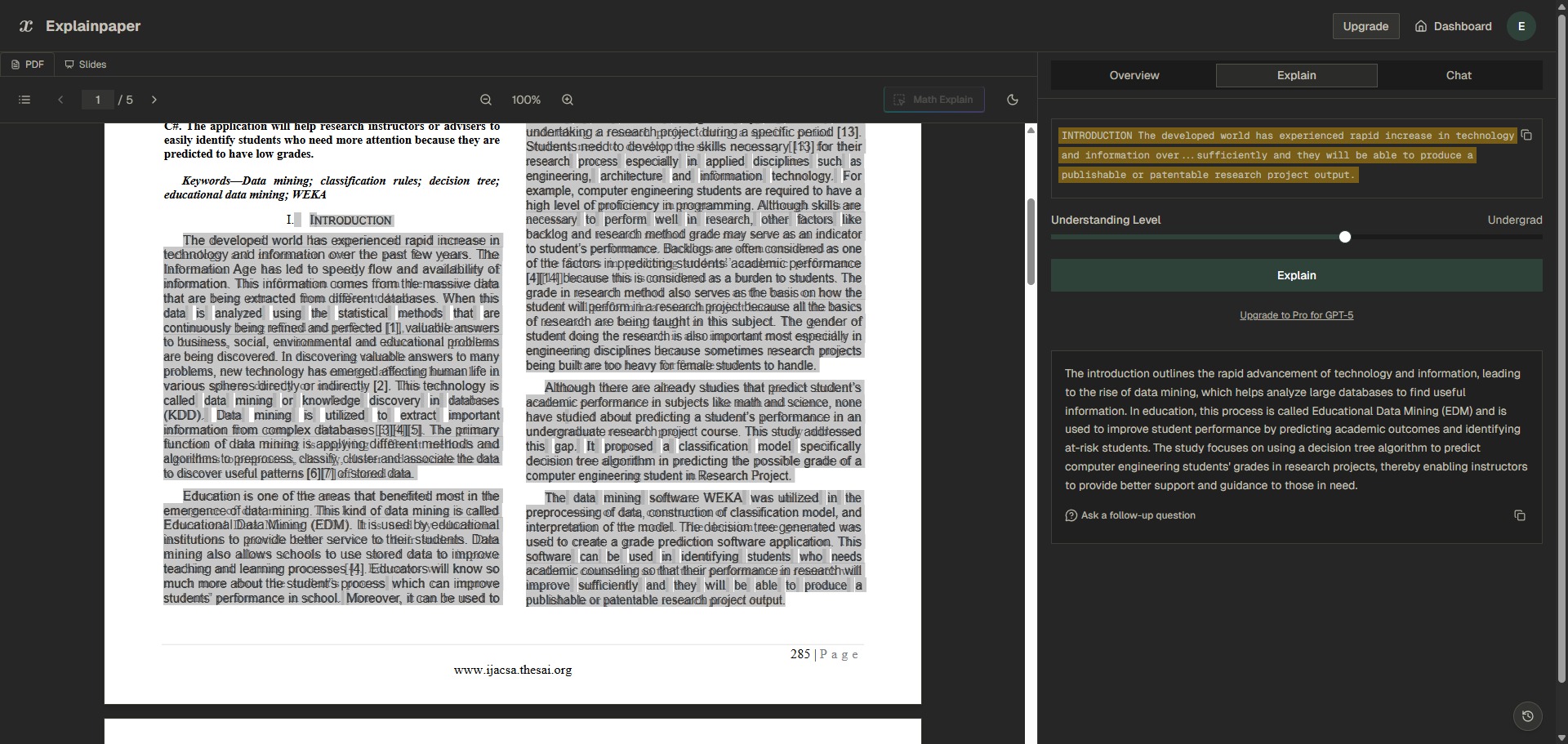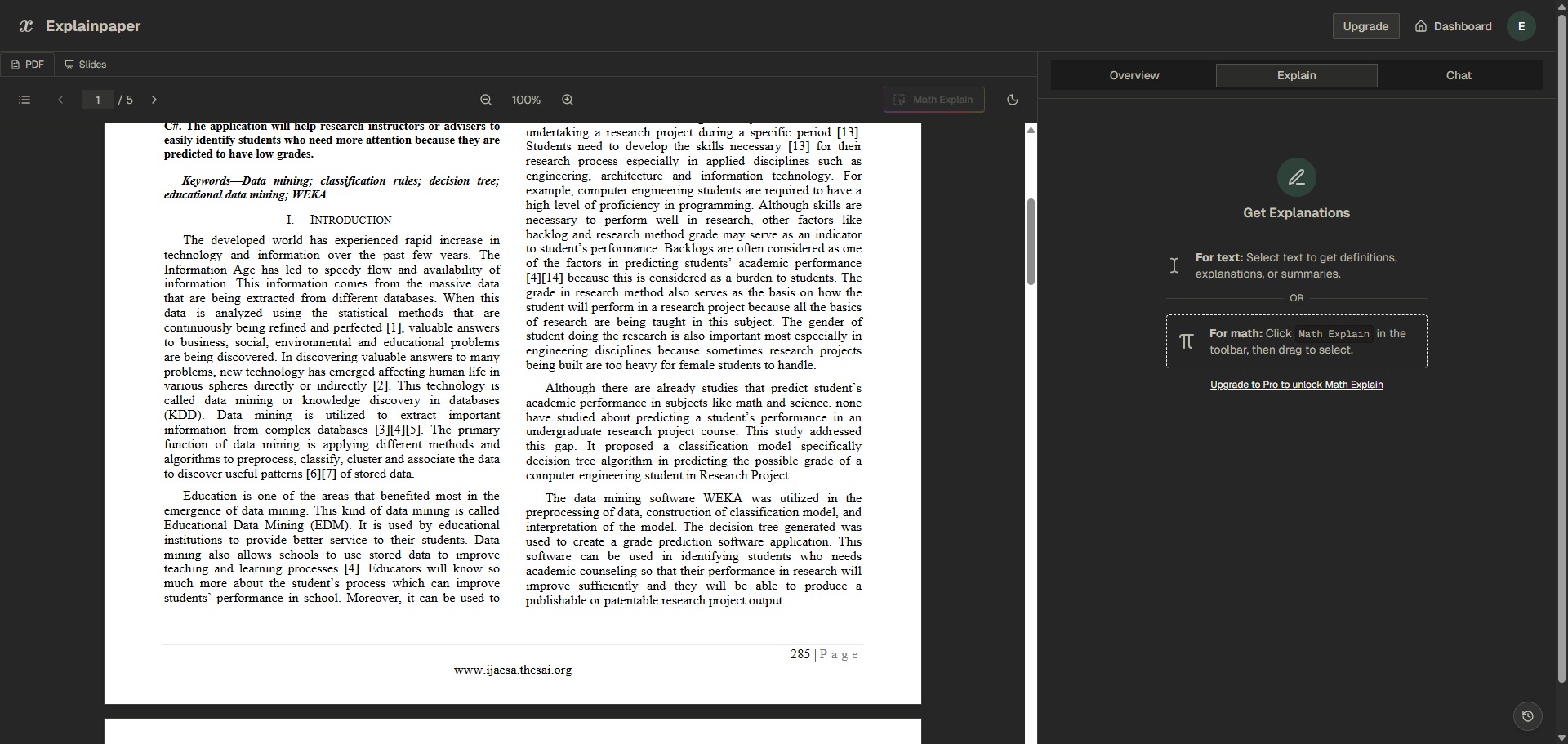
Explainpaper is a freemium, cloud-based research assistant and document processing platform engineered to help university students, postdocs, and technical specialists decode dense scientific manuscripts, summarize text blocks, and translate complex jargon into clear language.
Operating as an interactive academic workspace, Explainpaper uses contextual language models to eliminate the frustration of reading highly technical literature. By allowing users to upload documents and highlight tricky terminology on a split-screen dashboard, the system breaks down complicated methodology metrics, obscure statistics, and nested sentence structures in real time.
Recommended
What can you use Explainpaper for?
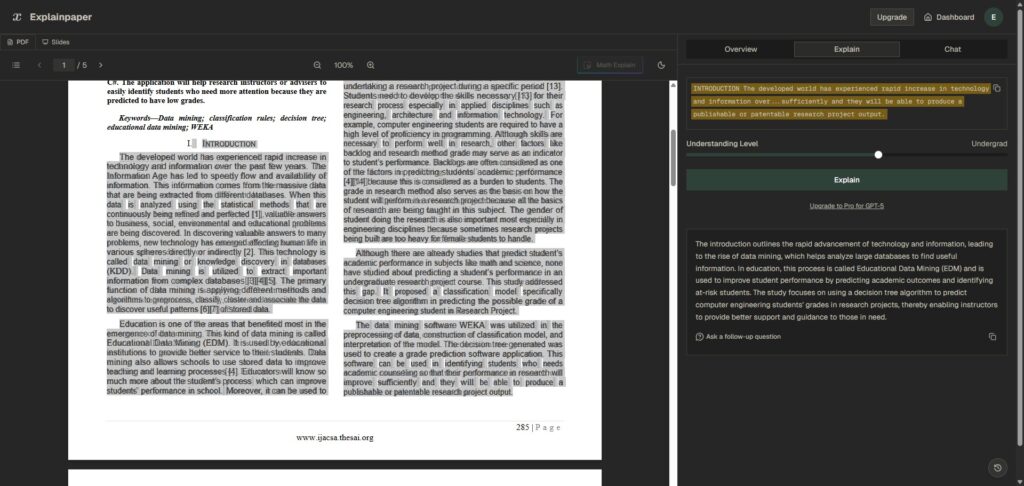
You can use it to instantly untangle difficult multi-clause sentences, run real-time document queries, and extract clear concept explanations from text. By highlighting any section of an uploaded manuscript, you can instruct the companion pane to translate specialized field expressions into accessible definitions tailored to your chosen level of expertise.
It also functions as an automated study synthesis desk. The system allows you to build an interactive dialogue with your uploaded PDFs, giving you a way to interrogate specific sections, ask follow-up questions about experimental designs, and quickly confirm critical data trends without manual searching.
Who is Explainpaper best for?
It is ideal for university undergraduate and postgraduate students who are transitioning into heavy reading tracks and need to master unfamiliar disciplinary terminologies efficiently.
It serves as a fantastic resource for interdisciplinary researchers, science journalists, and data analysts who must evaluate technical articles outside their main domain of expertise without getting bogged down by field-specific jargon.
Is Explainpaper genuinely free?
Yes, Explainpaper provides a highly accessible free baseline framework that lets public users deploy its core text-decoding features without financial obligations. This unpaid plan tier lets you execute unlimited highlight-level explanations, ask continuous follow-up questions, and link up your personal Zotero library metrics.
To access full-document summary processing, you must transition your account profile to a paid subscription plan like the Pro tier. Upgrading lifts structural blocks, unlocks advanced language reasoning models, activates full text summary generation, allows you to save continuous workspaces, and gives access to specialized math and diagram decoding tools.
Is Explainpaper Premium Worth It?
Yes, but primarily if you are a postgraduate researcher, PhD candidate, or clinical analyst managing extensive literature reviews and requiring automated document summaries to meet tight deadlines. While the free tier is incredibly generous for running sentence-by-sentence text definitions, it locks out the bulk analysis options needed for processing large document lists.
When you should upgrade:
- You require complete document outlines: The free plan restricts full text synthesis. Premium plans allow you to generate comprehensive chapter summaries and conceptual overviews of whole papers instantly.
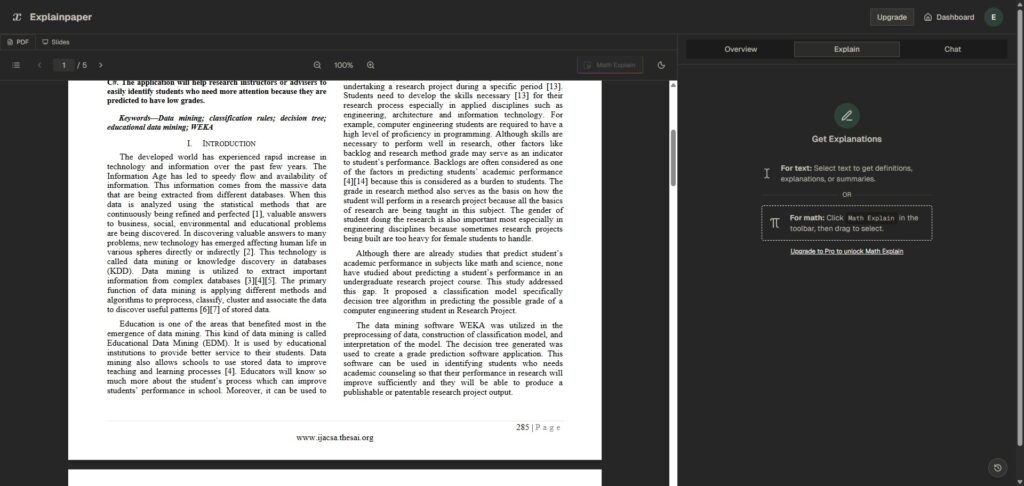
- You need to decode advanced math files: Upgrading activates the specialized Math Explain feature, which reads complex variables, algorithmic code blocks, and chart formulas to detail the exact underlying mathematics.
- You want to save your historical workspace markings: Paid subscriptions allow you to save your highlighted texts, compiled explanations, and chat histories across a permanent document directory for later reference.
If you only require a quick helper to clarify confusing jargon words or decode an isolated definition, the free tier is perfectly capable. However, for running systematic summaries across dozens of files simultaneously, the premium subscription is a fantastic, time-saving workspace expansion.
Should I use Explainpaper as a research paper summariser?
Yes. It is an excellent, comprehensive tool for discovering scholarly literature, tracing citation networks, and finding accessible versions of research documents across almost every academic discipline.
Because it covers multiple areas of study in one central place, it makes the initial discovery process fast and straightforward. It serves as an essential starting point for any literary search before diving into niche database systems.
Key Features
- Interactive split-screen text highlighting
Pairs your uploaded document directly with an AI explanation sidebar, generating simple contextual definitions for selected phrases instantly. - Adjustable explanation complexity slider
Allows you to configure your explanation output metrics to distinct reading levels, stretching from total beginner up to expert researcher. - Context-aware document Q&A chat
Enables you to run deep interactive dialogues with your file, asking for specific details grounded solely in the underlying paper data. - Specialized Math Explain formula reader
Parses complex mathematical expressions, data graphics, and algorithmic layouts to break down underlying calculation rules clearly. - Direct cross-platform Zotero library syncing
Connects your desktop reference collections directly to your digital workspace, enabling seamless metadata imports and text uploads.
Best for
- Decoding complex technical jargon and definitions
- Generating real-time explanations for text fragments
- Interrogating research PDFs using interactive chat portals
- Breaking down intricate math formulas and graphics
- Simplifying early-stage academic literature reviews
Pros and Cons
Here are the main advantages and limitations of using Explainpaper for document text decoding.
Pros
- ✓Interactive sliders make it remarkably simple to map complex definitions down to your exact level of comfort.
- ✓The context-aware diagnostic setup prevents the tool from hallucinating outside the boundaries of the text file.
- ✓The free plan provides an unlimited volume of text highlight lookups without forcing payment methods.
Cons
- ✗Core document processing options, such as full text summaries and broad chats, require premium memberships.
- ✗The parsing engine is built strictly for standard PDF file configurations, completely omitting Word or Excel extensions.
- ✗Can exhibit formatting errors or drop text fragments if a manuscript features highly corrupted formatting tracks.
How to Use Explainpaper
Follow this quick guide to run your interactive text explanations, configure reading complexity settings, and decode dense academic PDFs.
- Visit the Website and Sign Up
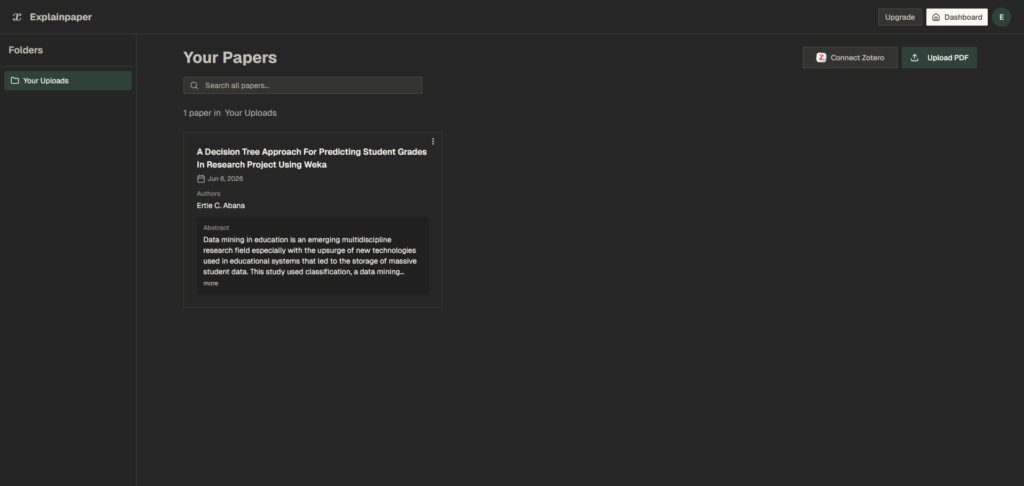
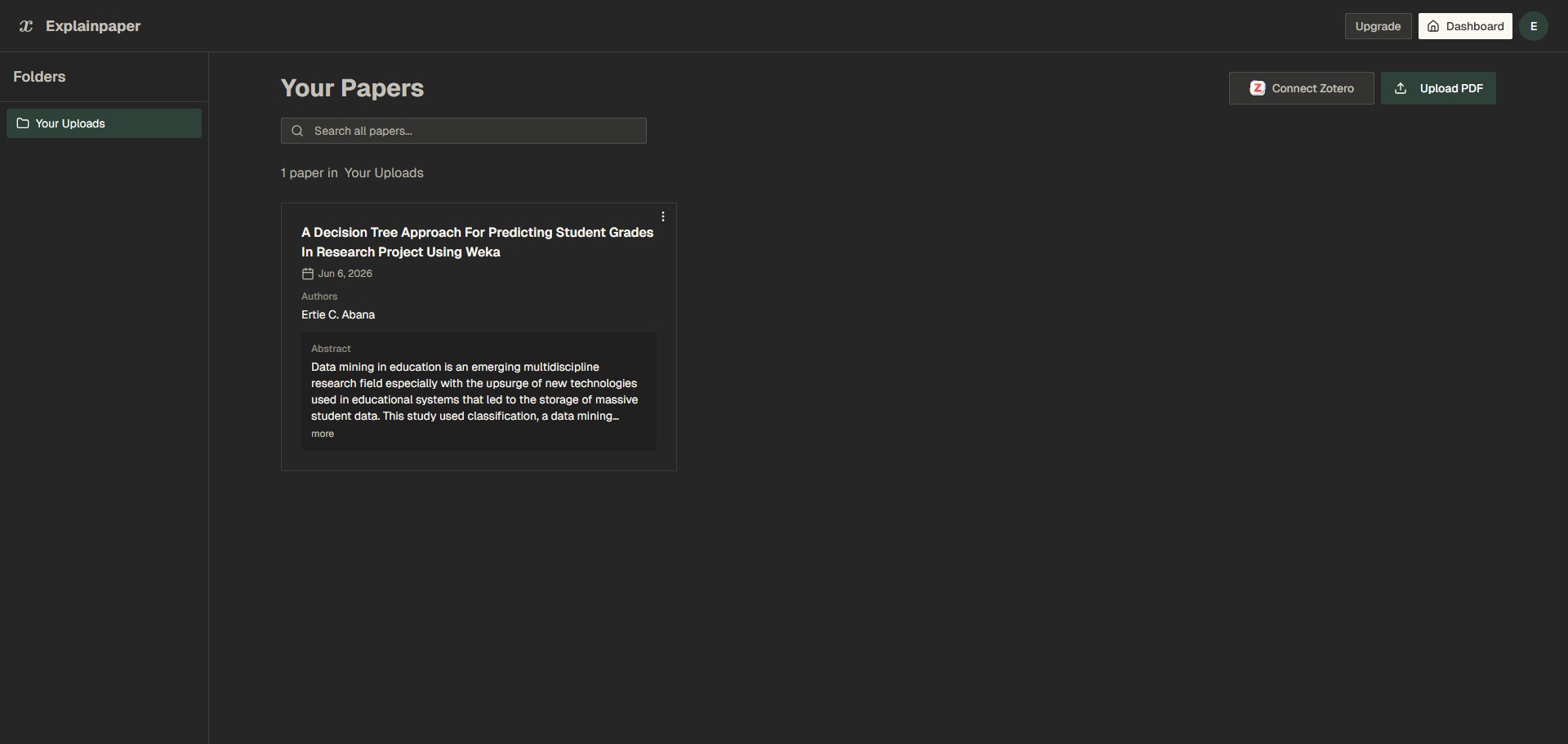
Go to the official Explainpaper web address. Create an account profile to log into your digital dashboard panel, which stores your active project tracking listings and reference file connections securely in one spot. - Upload Your Target Research Paper
Drag and drop your chosen scholarly manuscript file in standard PDF layout straight into the dashboard upload zone. Alternatively, you can paste direct document reference web links to let the platform fetch the file context. - Configure the Explanation Complexity Slider
Before running text analyses, locate the reading level adjustment selector on the sidebar interface. Drag the configuration handle to match your target expertise tier, selecting levels from high school beginner up to seasoned professional investigator. - Highlight Confusing Jargon and Sentences
Scroll through your uploaded document on the main display viewer. Use your cursor to highlight a tricky phrase, specialized technical acronym, or convoluted multi-clause paragraph to prompt the AI decoder to generate real-time descriptions. - Interrogate the Document via Chat
Utilize the interactive dialogue console beneath the explanation screen to investigate deeper concepts. Enter targeted follow-up queries, such as asking the system to verify data values or outline precise study control factors without scanning the entire file manually. - Synchronize References with Zotero
Open your account properties to initialize your external citation manager connections. Linking up your custom Zotero library metrics lets you transfer folder layouts and fetch new publication profiles smoothly.
Frequently Asked Questions
Can Explainpaper translate foreign academic texts into my native language?
Yes. Explainpaper includes comprehensive multi-language support that handles over 50 international languages. When you highlight a technical segment inside an article, you can instruct the explanation pane to synthesize descriptions into your chosen language, simplifying interdisciplinary global study tasks.
Does Explainpaper allow users to extract charts or tables from documents?
While free baseline profiles operate on text highlights, users who upgrade to the Pro plan tier can access specialized visual model features. This advanced framework allows you to frame specific data charts, graphic models, or intricate structural grids to receive step-by-step metric analysis breakdowns.
Are my uploaded unpublished papers protected against public data exposure?
Yes. Explainpaper maintains high data privacy architectures for all individual accounts. Your uploaded documents and user profile records are securely isolated, meaning your unpublished research material or proprietary finding records are never shared with public scraping pipelines or outside model training pools.
Can I export the text explanations and summaries I compile into external files?
Yes. The platform workspace lets premium Pro tier account holders save, group, and archive their complete list of annotated texts, compiled jargon definitions, and interactive chat loops. These entries can be exported easily as clean text files to assist with drafting your formal review sections.
Why does the text highlighter sometimes fail to select sentences on certain files?
This issue occurs if your uploaded PDF file is a flat image scan that lacks an active underlying text layer. To resolve text extraction blocks on older archives, you should process your document through an Optical Character Recognition (OCR) scanner tool first to activate selectable text tracks before uploading.