ProWritingAid is a freemium, cloud-based AI writing assistant, stylistic editor, and digital copy coaching platform engineered to help university students, academic researchers, and creative authors polish manuscripts, clear up structural text elements, and improve general readability indexes.
Operating as a deep-diving developmental editing workbench, ProWritingAid moves beyond standard spellchecking systems by examining paragraphs across multiple structural vectors. The software runs over twenty-five independent analytical checks, scoring your drafts for sentence variety, tracking hidden cliches, evaluating passive voice usage, and highlighting repetitive syntax tracks inside one integrated workspace layout.
Highly Recommended
What can you use ProWritingAid for?
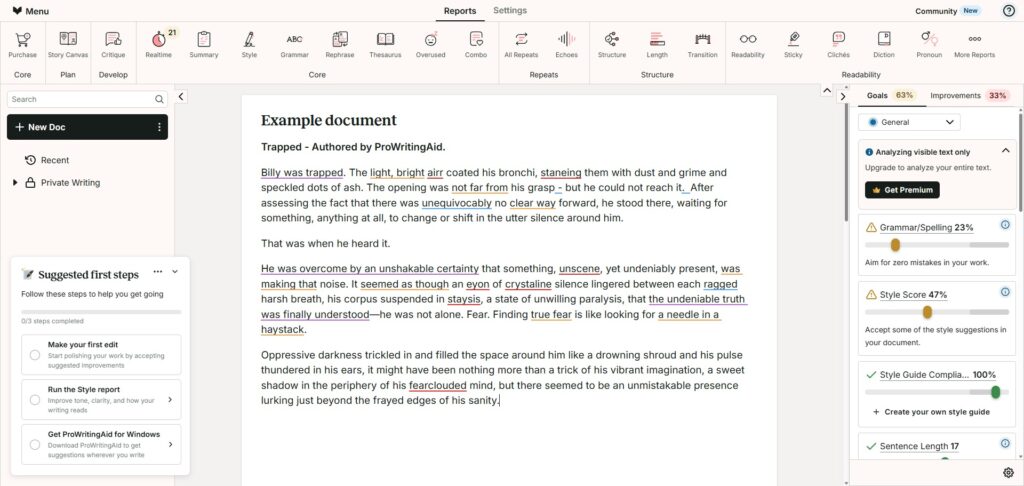
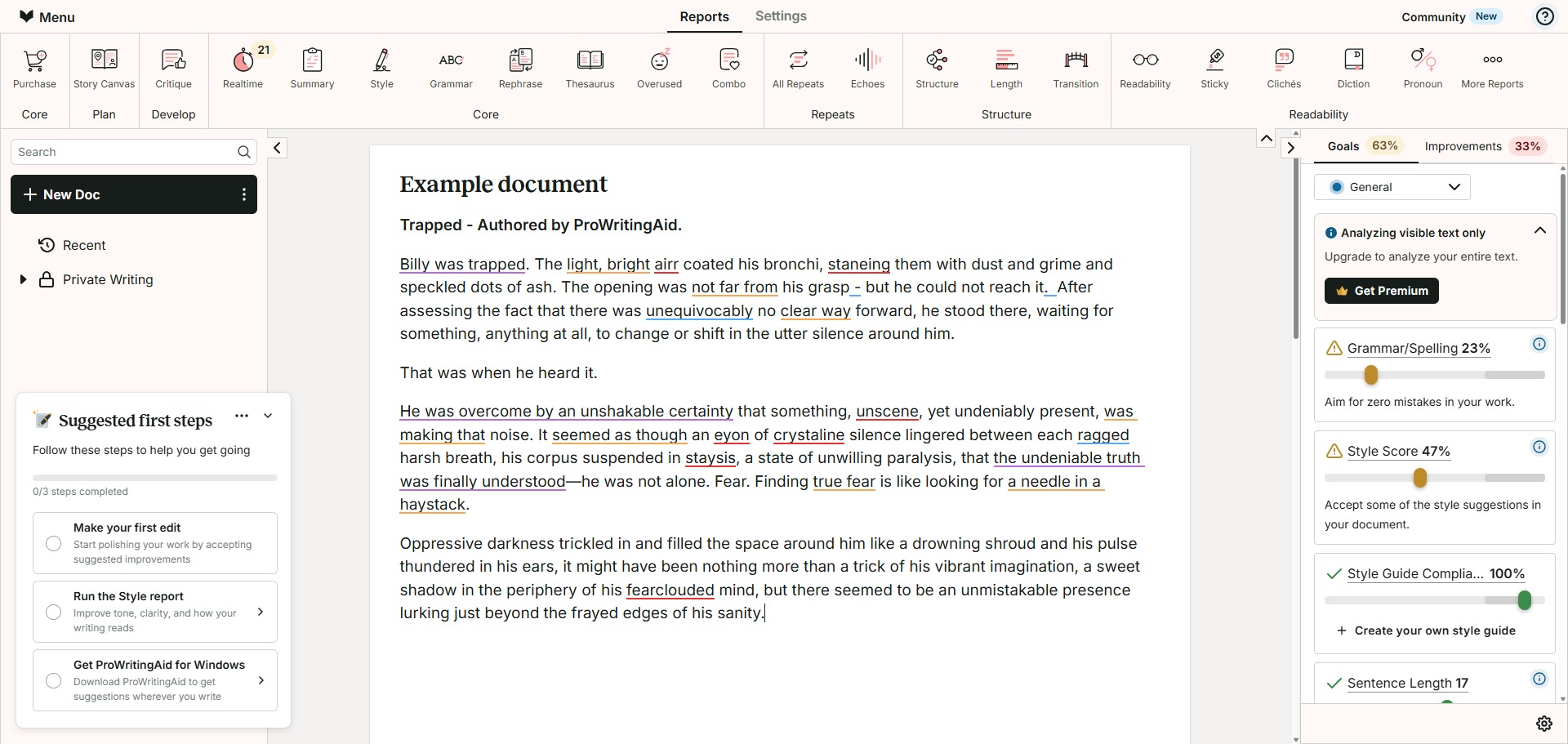
You can use it to spot convoluted phrase structures, remove vague filler words, and balance sentence length variations effortlessly. By opening your text inside its diagnostic display screen, you can click on interactive markers to inspect detailed style charts and view localized grammar explanations that explain exactly why a modification is being recommended.
It also functions as an interactive text rewriter and story mentor. The software incorporates dedicated rephrasing wheels and AI Sparks tools, allowing authors to turn informal fragments into formal expressions, adjust text rhythm parameters, shorten dense descriptions, or expand dialogue blocks within any digital document window.
Who is ProWritingAid best for?
It is ideal for postgraduate thesis writers, academic journal authors, and long-form novelists who are managing vast multi-chapter manuscripts and require deep developmental diagnostics to maintain high quality control.
It acts as a brilliant utility for professional copywriters, business report editors, and international communicators who want to establish custom corporate rules and polish sentence transitions before final presentations.
Is ProWritingAid genuinely free?
Yes, ProWritingAid provides a highly capable free basic plan that public users can access immediately across standard browser interfaces. This unpaid baseline tier allows you to execute real-time grammar checks, run basic spelling diagnostics, and view key readability metrics, though operations are subject to a maximum text window cap of 500 words per check.
To eliminate these document size limits and unlock advanced reporting arrays, users must purchase a premium subscription upgrade like the Premium or Premium Pro plan. Transitioning your user profile lifts all text capacity boundaries, activates unlimited sentence rephrasing paths, unlocks extensive desktop app add-ins, and grants access to automated chapter critique summaries.
Is ProWritingAid Premium Worth It?
Yes, but primarily if you are an active researcher, professional author, or professional editor who handles massive text files continuously and requires advanced stylistic reports to polish long-form drafts. While the free tier works beautifully for checking brief emails or single paragraphs, its strict 500-word ceiling makes it unsuited for handling complete chapters.
When you should upgrade:
- You edit long-form books or reports: The free tier limits active evaluations to 500 words at a time. Premium plans remove all document word caps, allowing you to scan whole manuscripts in a single execution loop.
- You need deep integration with local tools: Upgrading unlocks premium desktop add-ins, enabling the software panels to run smoothly inside professional tools like Microsoft Word, Scrivener, Apple Pages, and local browser extensions.
- You require automated story critiques: Paid tiers activate advanced structural analytics, such as the Chapter Critique tool, which runs deep contextual checks on your narrative layout, pacing parameters, and character behaviors.
If you only need a quick helper to fix minor punctuation errors or check isolated paragraph snippets, the free online interface is perfectly capable. However, for orchestrating large-scale document editing tasks and executing thorough style reviews, the premium subscription is an excellent, time-saving investment.
Should I use ProWritingAid as an AI writing assistant?
Yes. It is an excellent, comprehensive tool for discovering scholarly literature, tracing citation networks, and finding accessible versions of research documents across almost every academic discipline.
Because it covers multiple areas of study in one central place, it makes the initial discovery process fast and straightforward. It serves as an essential starting point for any literary search before diving into niche database systems.
Key Features
- Over twenty-five in-depth text analysis reports
Generates distinct summary evaluations targeting pronoun densities, overused phrases, sticky sentences, and transitions. - Context-aware interactive AI Rephrase modules
Suggests immediate structural alternatives to alter document tone, allowing you to turn sentences formal, casual, shorter, or more fluent. - Native desktop software and extension wrappers
Integrates seamlessly with local writing programs including Scrivener, Microsoft Word, Google Docs, and standard web browsers. - Custom style guide and terminology management
Allows you to set personalized linguistic rules, upload corporate term sheets, and specify exact naming rules for future reviews. - Grounded Author Comparison benchmarks
Compares your active writing metrics against the style profiles of over ninety celebrated fiction and non-fiction authors across various genres.
Best for
- Running deep developmental style reviews on long manuscripts
- Identifying repetitive sentence patterns and overused words
- Editing texts directly within Scrivener and Microsoft Word
- Polishing academic essays using specialized reference checks
- Comparing individual prose metrics against classic author profiles
Pros and Cons
Here are the main advantages and limitations of utilizing ProWritingAid for advanced text editing and stylistic reviews.
Pros
- ✓Provides the most extensive collection of distinct stylistic and structural reports in the industry.
- ✓Native integration with professional long-form writing tools like Scrivener is exceptionally smooth.
- ✓In-line educational explanations and videos help authors build better writing habits over time.
Cons
- ✗The 500-word limit on the free version fragments the editing workflow for full-length documents.
- ✗The sheer volume of individual analytical metrics can feel overwhelming for casual users or brief tasks.
- ✗Processing entire multi-chapter manuscripts simultaneously can occasionally result in localized lag.
How to Use ProWritingAid
Follow this quick guide to run your advanced stylistic reports, deploy office integrations, and configure personalized writing style settings.
- Visit the Website and Access the Portal
Go to the official ProWritingAid web platform. Register a profile to enter your central dashboard, which manages your active software extensions, custom dictionary profiles, and subscription details. - Download and Install Native Desktop Extensions
Navigate to the integrations panel and select your preferred text workflow add-ins. Install the desktop companion suite to link the software to your local files, or activate the specialized web extension. - Upload or Paste Your Manuscript Content
Open the cloud-based web editor window or load a project directly inside your newly integrated offline application interface. Input your drafted chapters to initiate the background text tracking scripts. - Review the High-Level Summary Report Metrics
Click the “Summary” button on your main workspace toolbar panel. Examine the dashboard visual graphics to evaluate your initial target thresholds for sentence lengths, sticky sections, and passive voices. - Execute Targeted Developmental Analysis Filters
Select individual analytics headers from the menu bar layout, choosing categories like Overused Words, Transitions, or Clichés. Click on the highlighted text tokens to review and accept localized alternative corrections. - Customize Your Persona and Style Guide Constraints
Open your account workspace adjustments panel to set precise rules. Input specialized technical terms into your private dictionary, or establish distinct business compliance naming laws for your team to check across items.
Frequently Asked Questions
Can I open and modify native Scrivener project files within ProWritingAid without breaking the code?
Yes. ProWritingAid offers a dedicated desktop application package built specifically to handle complex formatting file streams. This architecture opens your Scrivener project bins safely, letting you run editing updates while preserving your folder trees.
Are my private files and pasted manuscript chapters used to train open language systems?
No. ProWritingAid operates under strict user privacy architectures across all account profiles. Your text documents, analytical reports, and workspace updates are secure, meaning your text properties are never leaked to outside scraping operations or data pools.
What exactly is a sticky sentence, and how does the analyzer fix it?
A sticky sentence contains a high density of empty filler words that bloat paragraphs without adding value. The checker isolates these phrases, providing structural alternatives that strip out the dead weight to make sentences more active.
Does ProWritingAid offer a standalone academic plagiarism checking option?
Yes. The platform provides a specialized plagiarism verification tool that checks your text structures against expansive web indexes and journal paper repositories. Free users must purchase individual tokens, while premium plans offer monthly scan credits.
Can I select between British and American English grammar conventions inside my profile?
Yes. The workspace tools options menu includes an active dialect adjustment filter. You can configure your editor setting to check text against British, American, Canadian, or Australian English terminology and spelling standards effortlessly.